Add Dashboard Tile - Advanced Configuration
Overview
This guide shows how to add dashboard tiles that require loading all records and performing complex data processing using DataController. This approach is needed when simple QBE filtering is not sufficient and you need to compute values across the entire dataset.
📋 Version Requirement: The
mobile-shared-data-frommechanism was introduced in Maximo Application Suite (MAS) version 9.2.0. Ensure your environment is running MAS 9.2.0 or later to use this feature.
📚 For comprehensive details on cross-app data sharing, see the Cross-App Datasource Sharing Guide which covers multiple fallback sources, schema requirements, and advanced patterns.
What is a Dashboard Tile?
Dashboard tiles display key metrics and counts. This advanced approach allows you to compute complex values across all records.
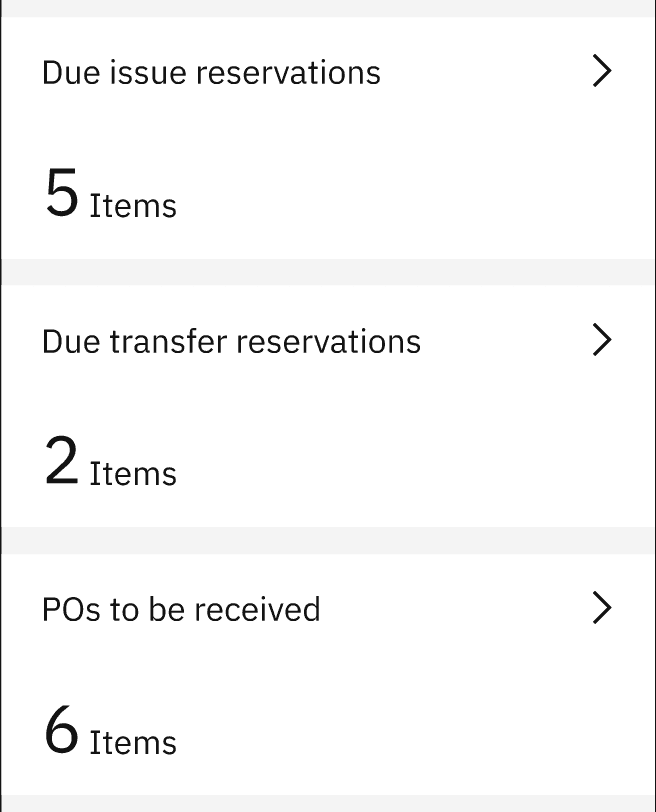
Example dashboard tiles showing computed counts from multiple datasources
Use Cases:
- Computing aggregated values across all records
- Complex filtering logic that can’t be expressed in QBE
- Calculations requiring multiple datasource fields
- Custom business logic for tile values
- Scenarios where page-wise loading with QBE is not possible
Prerequisites:
- Understanding of datasources
- Knowledge of DataController patterns
- Familiarity with mobile-shared-data-from
- Understanding of cross-app datasource sharing
- JavaScript/ES6 knowledge
When to Use Advanced Configuration
Use this advanced approach when:
- ❌ QBE filtering cannot express your filtering logic
- ❌ You need to load ALL records from a datasource
- ❌ You need complex calculations across multiple fields
- ❌ You need custom aggregations or computations
- ✅ You’re willing to manage memory carefully
- ✅ You understand the performance implications
Important: This approach loads more data into memory. Always test on actual mobile devices to ensure acceptable performance.
Implementation
Step 1: Add datasource to allowedAllRecordsLoadDS array
In your DataController, maintain an array of datasource IDs that are allowed to load all records. This is a safety mechanism to prevent accidentally loading too much data.
DataController.js:
class DataController {/*** Datasources allowed to load all records* Add datasource IDs here that need full dataset for computation*/allowedAllRecordsLoadDS = ['todaywoassignedDS','reservationsListDS',
Key Points:
allowedAllRecordsLoadDS: Array of datasource IDs that can load all records- Only datasources in this array will bypass page-size limitations
- This prevents accidental memory issues from loading too much data
Step 2: Create maximo-datasource with mobile-shared-data-from
Create the maximo-datasource that shares data from another app. This datasource will load all records for processing.
app.xml:
<maximo-datasourceid="todaywoassignedDS"object-structure="mxapiwodetail"saved-query="ASSIGNEDWOLIST"mobile-qbe-filter="{{'status_maxvalue': '!=COMP,CAN,CLOSE,WAPPR', 'hidewo': '!=HIDE'}}"order-by="wopriority"selection-mode="none"offline-immediate-download="true"pre-load="true"
Step 3: Create JSON datasource for computed values
Create a JSON datasource to hold the computed values that will be displayed in the tile.
app.xml:
<json-datasourceid="todaywoassignedDS_json"src="{[]}"controller="DataController"selection-mode="none"page-size="50"><schema id="gjw7p_JSON"><attribute name="wonum" searchable="true" id="g4dk9_JSON"/>
Key Points:
src="{[]}": Starts with empty array, will be populated by DataController- Includes computed attributes like
computedIsOverDueandcomputedTotalRecords - Schema matches maximo-datasource but adds computed fields
Step 4: Implement DataController logic
Implement the DataController to load all records, perform computations, and populate the JSON datasource.
DataController.js:
class DataController {/*** Datasources allowed to load all records*/allowedAllRecordsLoadDS = ['todaywoassignedDS','reservationsListDS','reservationsList4TransDS',
Step 5: Add dashboard tile
Add the dashboard tile that uses the JSON datasource with computed values.
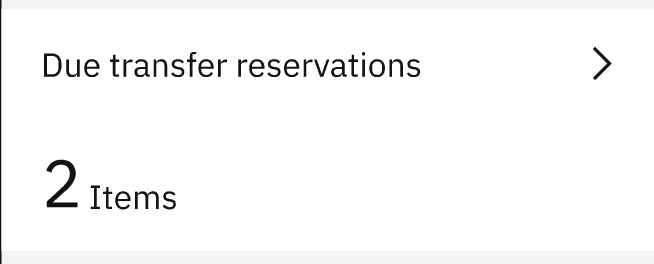
Example tiles showing “Due issue reservations” (5 Items) and “Due transfer reservations” (2 Items)
app.xml:
<page id="dashboardpage" title="Dashboard" controller="DashboardController"><dashboard id="dsdash1" use-with-mobile="true"><!-- Total work orders tile --><dashboard-value-tileid="dsdash1_t1"datasource="todaywoassignedDS_json"size="smallwide"value-field="computedTotalRecords"
Complete Example
Here’s a complete example showing work order tiles with overdue calculation:
app.xml:
<?xml version="1.0" encoding="UTF-8"?><maximo-application id="dashboardmobile" title="Dashboard" version="9.2.4.0"><!-- Maximo datasource with mobile-shared-data-from --><maximo-datasourceid="todaywoassignedDS"object-structure="mxapiwodetail"saved-query="ASSIGNEDWOLIST"mobile-qbe-filter="{{'status_maxvalue': '!=COMP,CAN,CLOSE,WAPPR', 'hidewo': '!=HIDE'}}"
Validation & Testing
How to verify:
Check all records are loaded:
- Open browser DevTools console
- Add logging in
loadAllRecordsmethod - Verify all pages are loaded
- Check
datasource.items.lengthmatches total count
Test computed values:
- Verify tile displays correct computed values
- Compare with manual count in source app
- Test edge cases (empty data, all overdue, etc.)
Monitor memory usage:
- Open DevTools Memory tab
- Load dashboard and check memory consumption
- Verify acceptable on target mobile devices
- Test with maximum expected data volume
Test offline mode:
- Load source app while online
- Enable airplane mode
- Open dashboard app
- Verify tiles display computed values
Common Issues:
Issue: Tiles show 0 or incorrect values
- Cause: DataController not processing data correctly
- Solution: Add logging to
computeValuesmethod, verify logic
Issue: Not all records loaded
- Cause: Datasource not in
allowedAllRecordsLoadDSarray - Solution: Add datasource ID to the array
- Cause: Datasource not in
Issue: Memory issues on mobile
- Cause: Loading too many records
- Solution: Reduce data volume with better mobile-qbe-filter, or use simple configuration
Issue: JSON datasource not updating
- Cause: Datasource name mismatch or update logic error
- Solution: Verify JSON datasource name follows pattern
{datasourceName}_json
Best Practices
✅ Do:
- Add datasource to
allowedAllRecordsLoadDSarray explicitly - Use mobile-qbe-filter to reduce initial data volume
- Test memory usage on actual mobile devices
- Add error handling in DataController methods
- Log computation steps for debugging
- Document why advanced configuration is needed
- Consider performance implications
❌ Don’t:
- Load all records without adding to
allowedAllRecordsLoadDS - Skip mobile-qbe-filter (loads unnecessary data)
- Forget to test on low-end mobile devices
- Perform expensive computations in tight loops
- Ignore memory constraints
- Use this approach when simple QBE filtering would work
Memory Optimization Tips:
- Use mobile-qbe-filter to pre-filter data before loading all
- Only load fields needed for computation
- Clear intermediate data structures after computation
- Monitor memory usage during development
- Test with maximum expected data volume
- Consider pagination if dataset is very large
Performance Considerations
Loading All Records:
- Each
loadRangecall fetches one page from local database - Multiple pages = multiple database queries
- Can impact performance with very large datasets
- Always test with realistic data volumes
Computation Performance:
- Keep computation logic efficient
- Avoid nested loops where possible
- Use array methods like
filter,reduceefficiently - Consider caching computed values if recalculated frequently
Memory Impact:
- Loading all records increases memory usage
- JSON datasource adds additional memory overhead
- Test on devices with limited memory (older phones)
- Monitor memory in DevTools during development
Related Resources
Prerequisites:
- Datasources Guide - Understanding datasources
- Add Dashboard Tile - Simple - Simple configuration with QBE
- Cross-App Datasource Sharing - Comprehensive guide on mobile-shared-data-from
- Client-side Datasource Filtering - In-memory filtering
Related Practices:
- Dynamic Mobile QBE Filter - Dynamic filtering
- Additional Logic to Controllers - Extending controllers
Next Steps:
- Consider if Simple Configuration would work for your use case
- Review Performance Mobile Doclinks for optimization techniques
- Learn more about Cross-App Datasource Sharing patterns
Summary
Use this advanced configuration when:
- ✅ QBE filtering cannot express your logic
- ✅ You need complex calculations across all records
- ✅ You need custom aggregations
- ✅ You’ve tested memory usage on target devices
- ✅ Simple configuration is insufficient
Key Components:
- allowedAllRecordsLoadDS: Safety array for datasources that can load all records
- maximo-datasource: Shares data from source app with mobile-qbe-filter
- json-datasource: Holds computed values for tile display
- DataController: Loads all records, computes values, updates JSON datasource
Remember: Always prefer the Simple Configuration when possible. Only use this advanced approach when absolutely necessary, and always test memory usage on actual mobile devices.