Complex Assets Accelerator
Overview
IBM Maximo Manage Complex Assets is an accelerator that provides organizations with comprehensive capabilities to manage complex, high-value assets where safety and regulatory compliance are critical success factors.
It delivers an integrated solution for the entire complex asset maintenance lifecycle from entry into service until retirement.
The Complex Assets accelerator leverages the proven capabilities of the Maximo Manage Aviation solution but employs industry-agnostic terminology, making it suitable for organizations in industries such as:
- Rail - Rolling stock, locomotives, and rail infrastructure
- Marine - Vessels, ships, and maritime equipment
- Space - Spacecraft, satellites, and space technology components
- Defense - Military vehicles and equipment
The Complex Assets accelerator was officially released on November 1, 2024, and is available through the Maximo Application Suite Accelerator Catalog.
Key Features and Capabilities
Asset Configuration Management
The accelerator provides comprehensive configuration management functionality:
- Component Hierarchies: Manage complete asset build structures with full traceability of serial numbers and parts
- Real-Time Validation: The Build Data Interpreter (BDI) continuously validates that the asset's current configuration conforms to design and regulatory rules
- Lifecycle History: Track every install/remove action with historical views for audits and investigations
- Dynamic Maintenance Plans: Maintenance schedules automatically adapt based on current configurations
Technical Records Management
- Technical Publications: Record and manage technical publications received from various parties
- Engineering Assessment Orders: Formally assess technical publications and plan required engineering orders
- Configuration Rules: Define and enforce configuration rules across asset models
- Compliance Tracking: Ensure all assets meet regulatory and design requirements
Maintenance Planning and Execution
- Work Packages: Bundle work orders of different types for efficient maintenance execution
- Operator Maintenance Programs (OMP): Define and manage agreed maintenance programs for asset types
- Master Task Cards: Create templates for preventive maintenance tasks
- Maintenance Task Library: Import and manage maintenance tasks from external sources
Fleet and Asset Management
- Fleet Management: Organize configuration-managed assets into logical groups
- New Asset Assemblies: Use templates for creating complex asset assemblies
- MRO Location Management: Manage maintenance, repair, and overhaul facilities
- Asset Roles and Capabilities: Define roles and capabilities associated with assets
Service Provider Capabilities
- Customer Management: Manage both external and internal customers
- Customer Agreements: Define pricing and billing schedules for services
- Bill Review and Customer Billing: Comprehensive billing workflow for service providers
- Response Plans: Automate responses to tickets and work orders at different process stages
Quality and Compliance
- Audit and Survey Management: Conduct and track audits and surveys
- Defect Tracking: Record and manage quality defects
- Regulatory Compliance: Maintain electronic references of regulations and standards
- Operating Procedures: Document key points of standards and procedures
Solution Benefits
Operational Excellence
- Improved Asset Uptime: Proactive maintenance planning reduces unplanned downtime
- Configuration Control: Ensure what's installed is exactly what should be installed
- Optimized Maintenance: Bundle work efficiently when assets enter repair facilities
- Resource Optimization: Better scheduling and resource allocation
Compliance and Safety
- Regulatory Compliance: Track and maintain compliance with industry regulations
- Safety Management: Integrated safety and quality management capabilities
- Audit Trail: Complete history of all configuration changes and maintenance activities
- Certification Tracking: Manage certifications for locations, companies, and personnel
Financial Performance
- Cost Visibility: Track performance and costs across multiple assets using component codes
- Billing Automation: Streamline billing processes for service providers
- Warranty Management: Track and manage warranties for assets and items
- Inventory Optimization: Better management of rotables, consumables, and shelf-life items
Decision Support
- Performance Tracking: Monitor asset and component performance over time
- Lifecycle Visibility: Complete view of asset lifecycle from entry to retirement
- Data-Driven Insights: Make informed decisions based on comprehensive asset data
Architecture and Components
The Complex Assets accelerator builds upon multiple Maximo components to deliver comprehensive functionality:
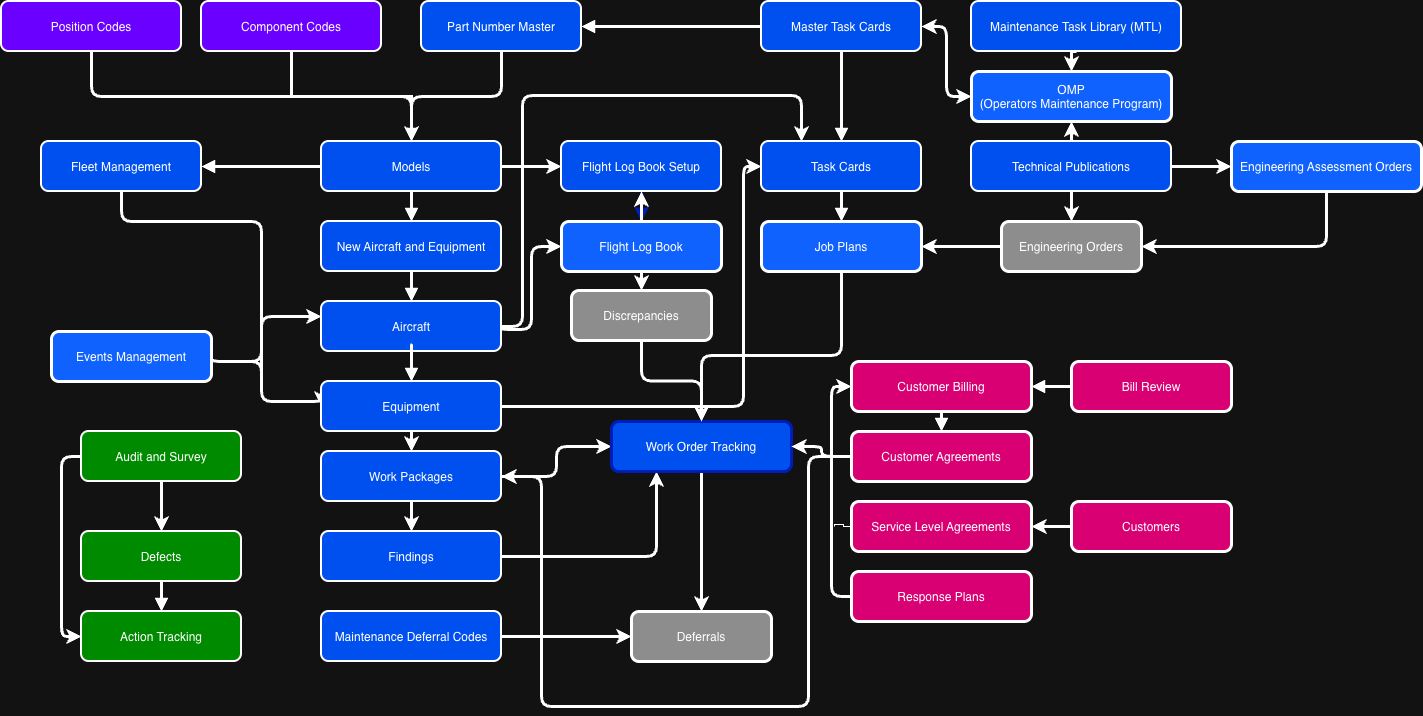
Terminology Differences
One of the key features of the Complex Assets accelerator is the use of industry-agnostic terminology instead of aviation-specific terms. This makes the solution accessible to a broader range of industries while maintaining the same powerful functionality.
The Complex Assets Accelerator employs different terminology than that of Maximo Aviation. However the applications and capabilities are identical to Maximo Aviation.
For a comprehensive list of terminology differences, refer to the IBM Support documentation linked in the References section below:
https://www.ibm.com/support/pages/maximo-manage-complex-assets-and-aviation-terminology-differences
Prerequisites and Requirements
System Requirements
- Maximo Manage: Version 9.0.x or higher
- Aviation Component: Must be enabled as a prerequisite
- Maximo Application Suite: Compatible with MAS 9.0+
Compatibility Note: The Complex Assets accelerator has compatibility restrictions with other Industry Solutions and Add-ons. Consult the Maximo Manage Compatibility Matrix before installation.
Installation
The accelerator is provided as a free downloadable customization archive that can be deployed using the standard Maximo Manage customization process.
Installation Steps:
- Ensure Maximo Manage 9.0.x is installed
- Enable the Aviation component
- Download the Complex Assets customization archive
- Deploy using the standard Manage customization process
For detailed installation instructions, refer to the Maximo Manage documentation.
Use Cases
Rail Industry
- Rolling Stock Management: Track configurations of locomotives and rail cars
- Component Tracking: Manage bogies, engines, and other critical components
- Maintenance Scheduling: Plan maintenance based on usage and regulatory requirements
- Fleet Optimization: Optimize fleet utilization and maintenance windows
Marine Industry
- Vessel Management: Manage ship configurations and equipment
- Dry Dock Planning: Plan and execute major maintenance during dry dock periods
- Certification Tracking: Track vessel certifications and compliance
- Component Lifecycle: Manage engines, navigation systems, and other critical equipment
Space Technology
- Spacecraft Configuration: Maintain detailed configuration records for spacecraft
- Component Traceability: Track every component with complete serial number history
- Mission Planning: Coordinate maintenance with mission schedules
- Regulatory Compliance: Ensure compliance with space industry regulations
Getting Started
Learning Resources
- Maximo for Aviation Foundations Course: IBM Training
- Maximo Manage Documentation: IBM Documentation
References and Additional Information
Official IBM Resources
- IBM Maximo Accelerators Catalog: https://www.ibm.com/products/maximo/accelerators
- Complex Assets Early Access: https://early-access.ibm.com/software/support/trial/cst/programwebsite.wss?siteId=2181
- Terminology Differences Documentation: https://www.ibm.com/support/pages/maximo-manage-complex-assets-and-aviation-terminology-differences
- IBM Community Announcement: https://community.ibm.com/community/user/blogs/lee-cotton/2024/10/30/announcing-maximo-manage-complex-assets-v900
Support and Community
For questions, support, and best practices:
- IBM Maximo Community: https://community.ibm.com/community/user/maximo
- IBM Support: Contact your IBM representative or support team
- Maximo Compatibility Matrix: https://www.ibm.com/docs/en/mas-cd/continuous-delivery?topic=requirements-maximo-manage
Next Steps
Recommended Actions
- Review Prerequisites: Ensure your Maximo environment meets the requirements
- Access Training: Complete the Maximo for Aviation Foundations course
- Download Accelerator: Access the Complex Assets customization archive
- Plan Implementation: Identify your use cases and implementation approach
- Engage Support: Work with IBM or a certified partner for implementation guidance