BDI Configuration
Overview
A single instance of the BDI is automatically deployed, with default settings, when Manage is activated with ACM in a MAS Workspace.
Additional instances of the BDI can be configured if it is determined that a single instance is not validating all configuration managed assets frequently enough (this is typically a business decision).
The individual configuration of each instance can be modified by clicking the "View" link.
Before configuring additional instances it is advised that the various settings which control the BDIs operation are first analysed to determine if changes can be made to increase the throughput and alleviate bottlenecks.
The user interface for the BDI settings, in the Manage Workspace activation page, is shown below:
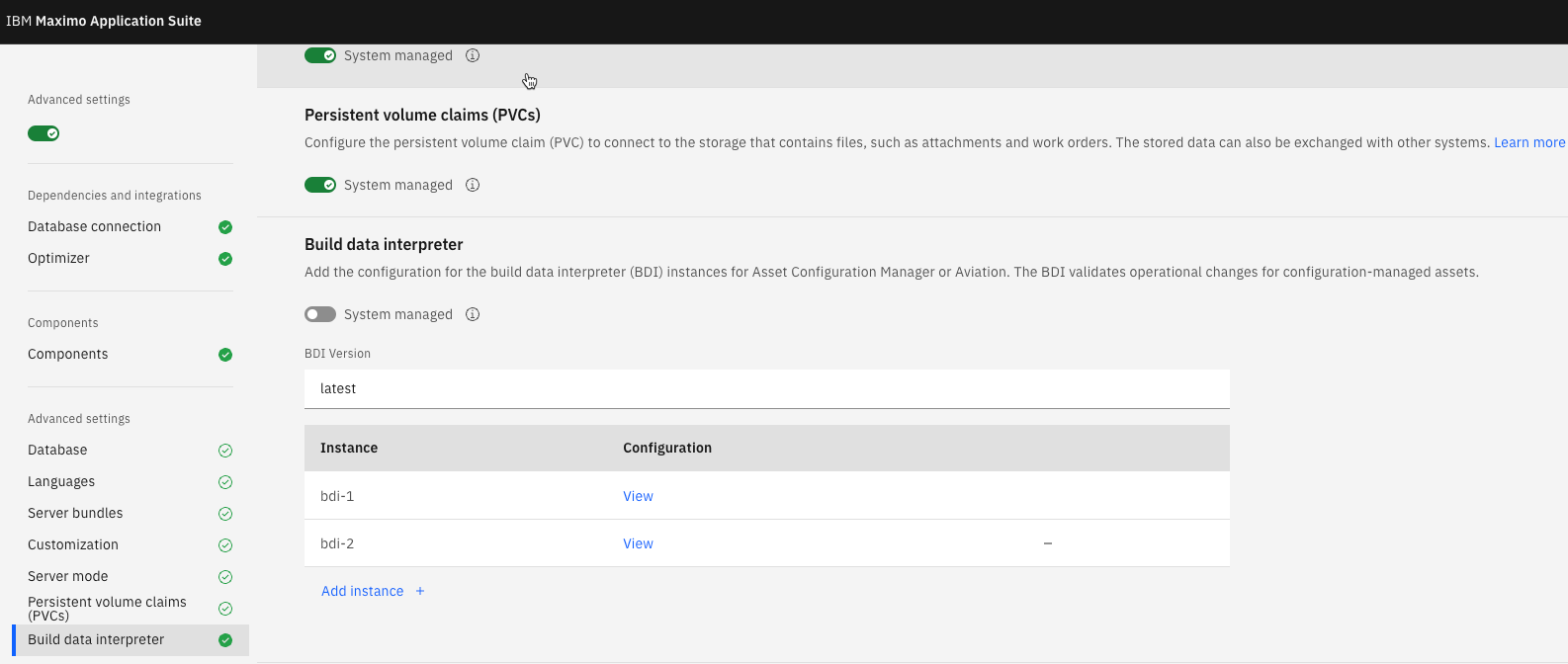
BDI Configuration Settings
Individual BDI Instance settings can be altered in the dialog shown below:
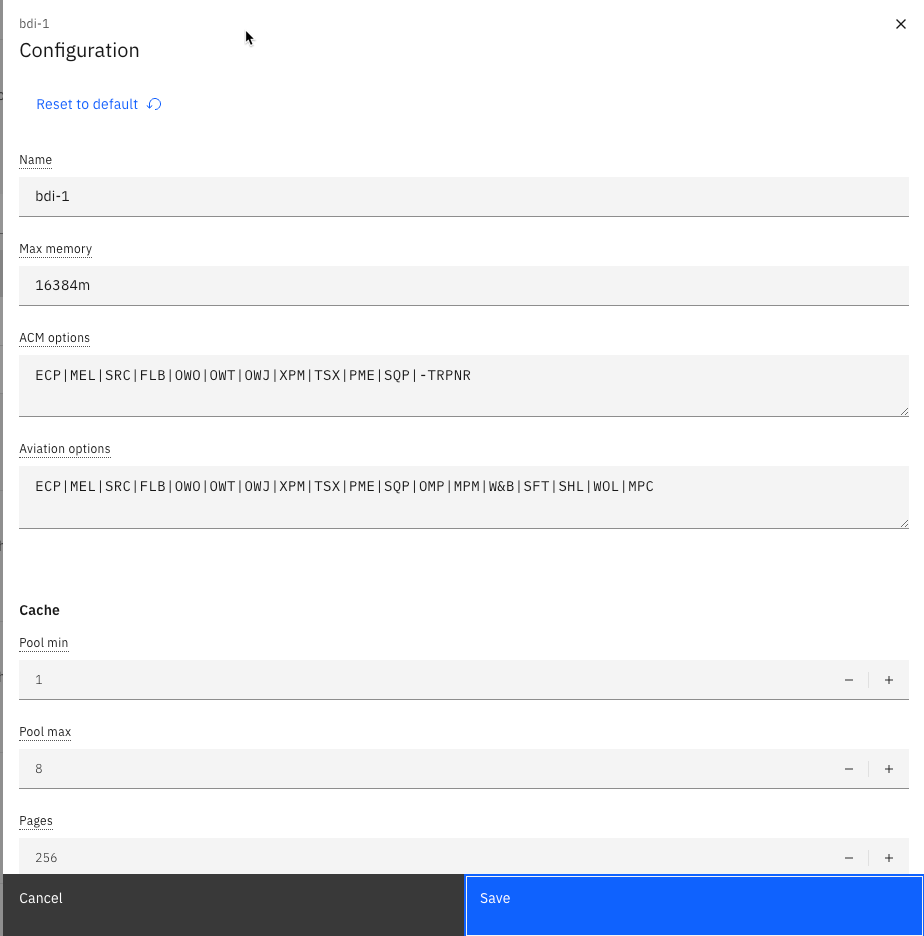
A full description of each BDI Instance configuration setting is detailed below:
General Settings
Name:
A unique name for the BDI instance. It is recommended the default value is used.
Max memory:
The maximum Java heap memory that is assigned to the BDI instance. The BDI application is a web application deployed to Websphere Liberty.
This setting is used to set the '-Xmx' JVM option used with the Liberty application server.
The Advanced Configuration topic discusses using Pod Templates to provide addtional control over what resource limits are applied to the BDI container/pod.
ACM and Aviation Options:
The Aviation/ACM Options parameter is used to alter the functional behaviour of the BDI. Which one is used depends on which product is enabled.
There a number of options which can be set which are detailed in a separate section.
Cache Settings
Cache settings are used to control the memory usage of "cache" objects and the pool where they are taken from.
A cache object is taken from a pool to service the request to validate an asset. It contains data cached from the Maximo database including Model, Asset and Preventive Maintenance data.
Increasing the amount of memory used by a cache can improve performance but the trade off is increased memory consumption.
Pool min:
The minimum number of cache pool objects retained in the cache pool. It is initialised with this number when the BDI starts.
Pool max:
The maximum number of cache pool objects. For example if this is set to 8 the BDI instance will be able to service 8 simultaneous requests to validate an asset record.
If additional requests are made while all cache pool objects are in use then the request will wait a number of milliseconds before retrying.
The pool max should be >= (monitor.threads + vrex.workers + 1) to allow for enough cache objects to service requests from these processes simultaneously (detailed below).
Pages and Assets per Page:
These parameters can be used to tune the memory usage vs. the operational performance of the BDI.
The default settings of 256 and 512 is generally suitable for a wide range of setups. This value means that each BDI cache pool object (used to service BDI requests) can “use” (i.e. hold in memory) a maximum of 256 pages (known as the “Cache Block Limit”) and each page can contain a maximum of 512 Maximo assets (known as the “Cache Block Size”) to give a total of 131072 assets.
AV Mem Mode:
The "AV Mem Mode" is used to control the number of meter readings and PM records which can be cached in memory.
Queue Monitor Settings:
The Queue Monitor or "Monitor" settings are used to control if, and how often, the BDI polls the BDI queue table (PLUSAANTRAN) looking for assets to validate.
There is a separate configuration setting (described below) which determines the SQL executed to identify the pending records awaiting processing.
Enabled:
Determines if the Monitor process is enabled.
Threads:
The maximum number of assets in the queue which will be processed in parallel. Increasing this setting will mean more queued records can be processed simultaneously but will increase CPU load.
Pulse seconds:
How often the BDI will poll the BDI queue table looking for assets to validate.
Clean Up Days:
The number of days before completed BDI Queue records (those with a status of COMPLETE or ERROR) will be automatically deleted.
VREX Settings:
The "VREX" process is used to process configuration managed assets on a fixed schedule in the background. This ensures that all configuration managed assets are validated regularly (how often is typically a business decision).
Enabled:
Determines if the VREX process is enabled.
Workers:
Controls the number of Assets validated in parallel by the VREX process.
Run on Start:
Controls whether the VREX process is executed immediately when the BDI pod is started.
Pulse Minutes:
Controls how often the VREX process is executed. The default is every 180 minutes (3 hours).
Start Time:
Instead of executing the VREX process every x minutes the start time parameter can be used to specify a time of day at which the VREX process should be executed. This overrides the Pulse Minutes parameter.
Async Job Settings:
The async job settings control the behaviour of when and how MAXASYNCJOB records are removed from the system.
Delete On Start-up:
This parameter controls whether the completed MAXASYNCJOB records are deleted when the BDI is started.
Retention Days:
The number of days which completed MAXASYNCJOB records, created by the BDI, are retained before being automatically deleted.
Other Settings:
Log Level:
Controls the logging verbosity of the BDI. A change to this value is deployed automatically without requiring the restart of the BDI pod.
Select:
The Select parameter is a series of SQL statements in an XML format. It is used to control which records the VREX and Monitor processes identify for processing.
It contains DB specific sql which determines:
- The end items which will be validated by the VREX process:
<end-item-select-{dbtype}> - The non-end items which will be validated by the VREX process:
<non-end-item-select-{dbtype}> - The BDI queue records waiting for processing:
<service-monitor-select> - The Assets the BDI will consider for inclusion in its cache:
<cache-select> - The Master PM records the BDI will consider as part of validating an asset:
<masterpm-select>