BDI Options
Overview
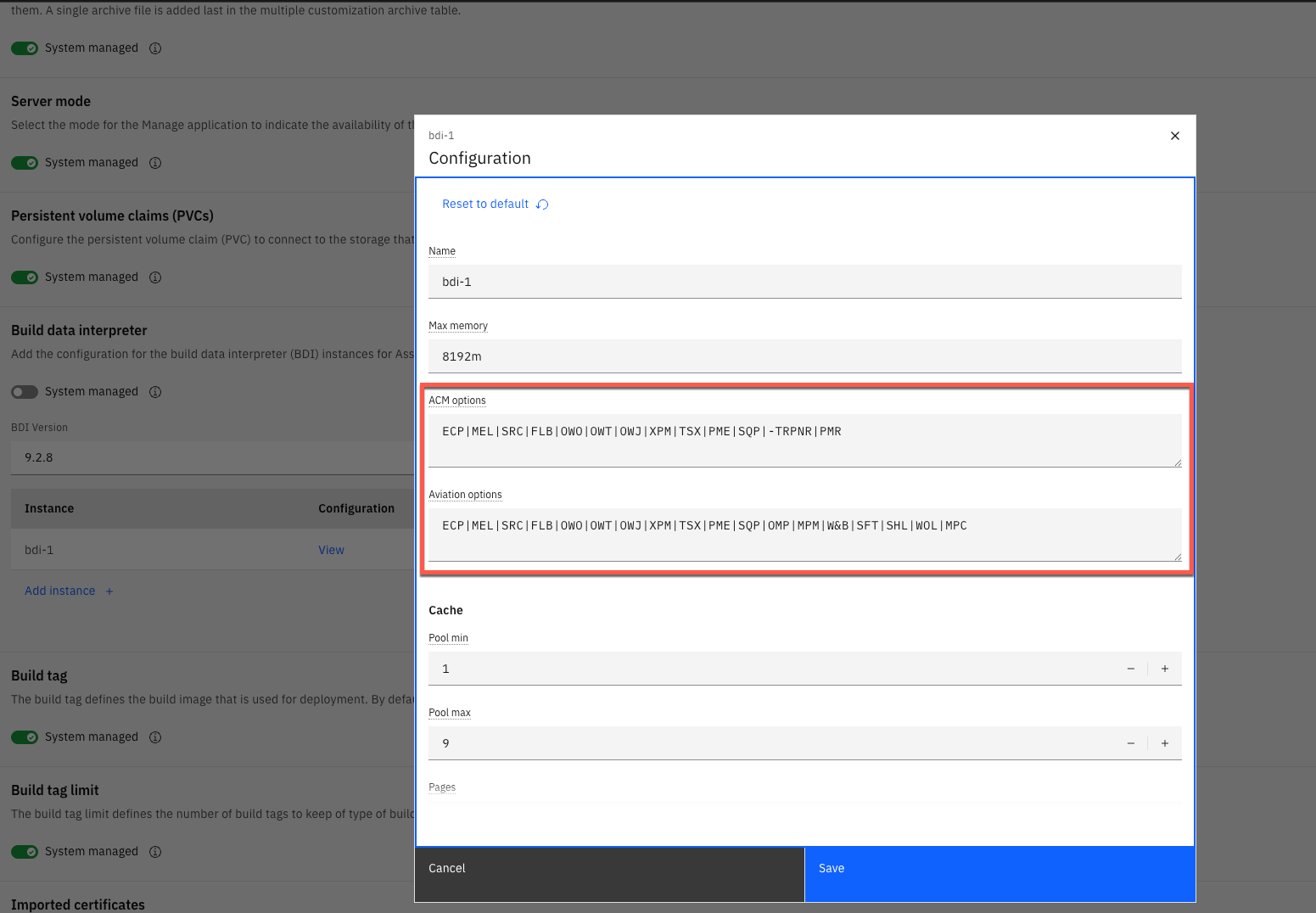
The ACM and Aviation Options parameters, specified within the BDI Instance configuration, are used to alter the functional behaviour of the BDI.
Only one option is used and this is determined by which product is installed.
The list of options available, and the effect they have on the BDI behaviour, is described in the table below.
Those options that are only available in Maximo Aviation are indicated with a "Y" in the "Aviation Only" column.
| Option Value | Description | Aviation Only |
|---|---|---|
| ECP | Enables Event Calculation Persistence. The BDI will calculate and save values for the following fields on the PLUSALFEVENT table: P_LEFT, P_DUECOUNT, P_ENDITEMDUECOUNT, CALCDUEDATE, DATEDUECALC. P_LEFT = The number of days remaining until the due date or the number of meter units remaining until the due count. P_DUECOUNT = The due count at which the event (PM) will be due. P_ENDITEMDUECOUNT = The count at which the event (PM) will become due for the top level end item asset record. CALCDUEDATE = The estimated due date at which the event (PM) is due. This is equal to the due date for time based events. For meter based events this will be determined from the units remaining and the meter average of the asset. DUEDATECALC = The date and time when the PLUSALFEVENT record was last updated. | N |
| DCR | Enables the Due Count Reached feature. When enabled in combination with the ECP option the BDI will "freeze" the PLUSALFEVENT.CALCDUEDATE for meter based events at the point the event became overdue. | N |
| MEL | Enables MEL (Minimum Essential List) rules validation. A MEL problem is reported when the number of installed and operational items is less than the number required. The MEL is defined on the associated Model record. | N |
| MEL-RL | MEL problems are reported by Label. Requires MEL option to be enabled. | N |
| MEL-RP | MEL problems are reported by Position code. Requires MEL option to be enabled. | N |
| SRC | Enables the evaluation and validation of Systems, Roles, and Capabilities. Roles and Capabilities are defined within the application "Asset/Aircraft Roles and Capabilities". | N |
| FLB | Enables Flight Log Book validation (e.g. reporting AOG if Aircraft Status = GROUNDED) | N |
| OWO | Enables monitoring for Orphan Work Orders; A BDI problem code "OWO" is reported when a PM is made INACTIVE and open work orders exist for the PM. | N |
| OWJ | Enables monitoring for revised Job Plans; A BDI problem code "OWJ" is reported for open work orders where the associated Job Plan was revised post creation of the work order but before its completion. | N |
| OWT | Enables monitoring for PMs. A BDI problem code "OWT" is reported for each open work order where the PM it was generated from was revised post its creation but before its completion. | N |
| TSX | Enables persistence of Time Since Repair/Overhaul/Inspection and Life to Date Values. When enabled the BDI will calculate and persist life values in the PLUSAASSETTIMESINCE table for each configuration-managed asset/meter combination: SINCELASTREPAIR SINCELASTOVERHAUL SINCELASTINSPECT, SINCELASTINSPECT2 SINCEINSTALL LIFETODATE | N |
| XPM | See detalied explanation below | N |
| -TRPNR | Disables the Part Number Range capability associated with Technical Records. This option is mandatory when using the BDI with ACM. | N |
| PME | Enables PM Extensions logic. Required when PM Extensions should be considered when evaluating PM Due Date/Counts. | N |
| SQP | Enables the validation of Serialized Quantity Positions. Determines whether the BDI will report viloation of min/max quantity values when, a build position in a Model, is defined as a mutiple serialized quantity position. | N |
| SFT | Enables Soft Task validation. When a PM is flagged as a Soft Task (PM.PLUSASOFTTASK=Y) then the BDI Problem Codes associated with PM Due, Warning and Alert intervals are altered to the following. SBA - Soft Task Beyond Alert. SBW = Soft Task Beyond Warning. SBD - Soft Task Beyond Due. The SBD code is treated as an Alert conditionby default. (Compared with INVALID for and overdue non-Soft Task.) | N |
| PMR | When enabled the BDI will consider the "New Date" value specified on PM Forecast records when determining the PM Due Date. | N |
| OMP | Enables monitoring for expired OMPs. A BDI probem code "OEX" is raised for active OMP records where the associated Expiry Date has been exceeded. (OMP = Operators Maintenance Plan). | Y |
| MPM | Enables monitoring and validation of invalid mission flags on FLBs; MPM = Mission Profile-based Maintenance | Y |
| W&B | Enables Weight and Balance validation. When enabled the BDI will report a "WAB" problem code when the latest Weight and Balance record for an Aircraft is flagged as being outside of the expected variance (as defined in the associated Aircraft Model). | Y |
| WOL | Enables Whichever Occurs Later / Due on Last Deadline logic. When a Task Card is marked as "Due on Last Deadline?" (PM.PLUSADOLDEADLINE=Y) then it will only be considered overdue when all deadlines are exceeded (considers both Time and Meter Based frequencies/intervals) | Y |
| MPC | Deprecated. | Y |
| SHL | Enables Shelf Life logic. | Y |
| -UFI | This is an Oracle DB Specific option. When specified, it will disable the use and automatic creation of functional indexes on the rowstamp column of tables which the BDI montiors. The BDI uses rowstamp values to monitor for changes within the Maximo database. Maximo on Oracle uses the datatype VARCHAR2 for rowstamp values which can makes comparisons of rowstamp values of different lengths uncertain. By default the BDI will create functional indexes of the form: (cast(rowstamp as number) when used with an Oracle DB. This enables queries which order on the rowstamp column to behave reliably. If this option is disabled the BDI will now perform casts on the rowstamp values but will instead restamp all rowstamp values within a monitored tables when it detects rowstamps of different lengths within the table. | N |