Maintenance Task Library (MTL)
Overview
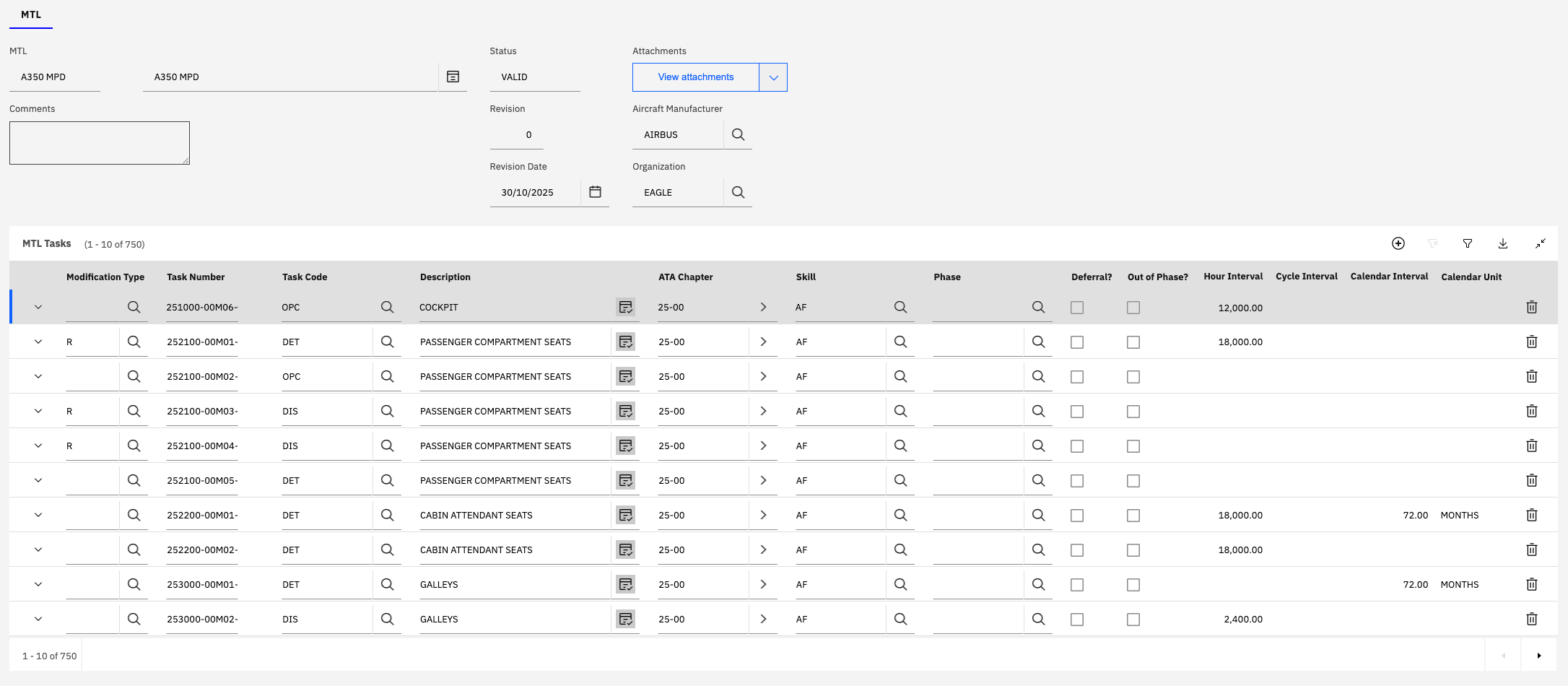
The Maintenance Task Library (MTL) application enables organizations to import, manage, and validate maintenance task data from aircraft manufacturers' Maintenance Planning Documents (MPD).
The MTL serves as an intermediate staging area where maintenance tasks are imported, reviewed, validated, and then converted into Master Task Cards as part of the Operators Maintenance Program (OMP) definition.
Purpose and Workflow:
The MTL application facilitates a structured workflow for managing manufacturer maintenance requirements:
- Import - Load maintenance task data from manufacturer MPD files (Excel format)
- Review - Examine imported tasks for completeness and accuracy
- Validate - Change status to VALID once tasks are verified
- Convert - Create Master Task Cards within the OMP from validated MTL tasks
The MTL application acts as a bridge between manufacturer maintenance requirements and your organization's operational maintenance program, ensuring that all regulatory and manufacturer-mandated tasks are properly captured and implemented.
Key Capabilities:
- Import maintenance tasks from manufacturer MPD files in Excel format
- Comprehensive task data including frequencies, intervals, and thresholds
- Task modification tracking (new, revised, deleted tasks)
- Validation workflow with status management
- Bulk conversion to Master Task Cards
- Integration with OMP application
- Support for multiple task types (inspections, services, overhauls, etc.)
- ATA chapter organization
- Skill and trade assignment
- Phase and zone information
- Part number associations
Integration Points:
- Master Task Cards - Target for converted MTL tasks
- OMP Application - Provides an action for the bulk creation of Master Task Cards from the MTL record.
- Part Number Master - Links tasks to specific components
- Job Cards - Master Task Cards can be linked to existing active Job Cards or a "default" Job Card can be created for each MTL Task using Zone and Craft information.
Benefits:
- Streamlines incorporation of manufacturer maintenance requirements
- Ensures compliance with regulatory and manufacturer mandates
- Reduces manual data entry and associated errors
- Maintains traceability from MPD to operational tasks
- Supports multiple MPD revisions and change tracking
- Enables efficient updates when manufacturers issue new MPD revisions
MTL Record Structure
An MTL record represents a complete maintenance task library for a specific aircraft type and MPD revision.
Header Information
The MTL header contains identifying information and metadata about the task library:
| Field | Description | Example | Required |
|---|---|---|---|
| MTL | Unique identifier for the MTL record | A350 MPD | Yes |
| Description | Descriptive name for the MTL record. | A350 MPD | Yes |
| Status | Current status of the MTL record | VALID, DRAFT, REVIEW | Yes |
| Revision | MPD revision number | 0, 1, 2 | Yes |
| Revision Date | Date of the MPD revision | 30/10/2025 | Yes |
| Aircraft Manufacturer | Manufacturer of the aircraft | AIRBUS, BOEING | Yes |
| Organization | Operating organization | EAGLE | Yes |
| Comments | Additional notes or comments | Free text | No |
Status Values:
| Status | Description | Usage |
|---|---|---|
| DRAFT | MTL is being created or edited | Initial import and review phase |
| VALID | MTL has been validated and approved | Ready for Master Task Card creation within the OMP |
| INACTIVE | MTL has been replaced by newer revision or is no longer required | Historical reference only |
Only MTL records with VALID status can be used to create Master Task Cards. Ensure thorough review and validation before changing status to VALID.
Revision Management:
- Each MPD revision should be imported as a new MTL record or revision
- Revision numbers typically follow manufacturer's MPD revision scheme
- Revision dates track when the manufacturer issued the MPD
- Multiple revisions can coexist in the system for historical reference
- Previous revisions can be retained for audit and traceability
MTL Tasks
The MTL Tasks section contains the detailed maintenance task information imported from the manufacturer's MPD. This is the core content of the MTL record.
Task Information Fields:
| Field | Description | Example |
|---|---|---|
| Modification Type | Indicates if task is new, revised, or deleted | N (New), R (Revised), D (Deleted) or blank (Unchanged) |
| Task Number | Manufacturer's task number | 251000-00M06-01 |
| Task Code | Short code for task type | OPC, DET, DIS, GVI |
| Description | Detailed task description | COCKPIT, PASSENGER COMPARTMENT SEATS |
| ATA Chapter | ATA chapter code | 25-00 (Equipment/Furnishings) |
| Skill | Required maintenance skill/trade | AF (Airframe) |
| Phase | Maintenance phase or check | A, B, C, D |
| Deferral? | Whether task can be deferred | Checked/Unchecked |
| Out of Phase? | Indicates whether the task is typically done "out of phase". Outside of a larger inspection event (A Check etc) | Checked/Unchecked |
| Hour Interval | Flight hour interval | 12000 FH |
| Cycle Interval | Flight cycle interval | 600 FC |
| Calendar Interval | Calendar time interval | 72.00 MO |
| Calendar Unit | Unit for calendar interval | MONTHS, DAYS, YEARS |
Task Code Examples:
| Code | Description | Typical Usage |
|---|---|---|
| OPC | Operational Check | Functional verification |
| DET | Detailed Inspection | Thorough visual inspection |
| DIS | Discard | Time-change item replacement |
| GVI | General Visual Inspection | Basic visual check |
| SVC | Service | Lubrication, replenishment |
| RST | Restoration | Overhaul, major repair |
| FNC | Functional Check | System operation verification |
Modification Type Indicators:
- R - Revised task (changes from previous MPD revision)
- Blank - Unchanged task (same as previous revision)
- D - Deleted task (removed in this revision)
- N - New task (added in this revision)
ATA Chapter Organization:
Tasks are organized by ATA chapter codes which represent aircraft systems. ATA Codes are defined within the "Component Codes" application.
Importing MTL Data
The "Import File" action is the primary method for loading maintenance task data from manufacturer MPD files into the MTL application. This process automates the creation of MTL tasks from structured Excel files.
Import Process Overview
Prerequisites:
- Manufacturer MPD file in Excel format (.xls or .xlsx)
- File must follow the MTL import file format specification
Import Workflow:
-
Prepare Import File
- Obtain manufacturer MPD file
- Verify file format matches MTL import specification
- Review data for completeness
-
Initiate Import
- Navigate to MTL application
- Open existing MTL record or create new one
- Enter MTL header information / required fields and save.
- Click Import MTL action
-
Upload File
- Select Excel file from local system and confirm
- Upload begins automatically and processing begins.
-
Monitor Processing
- System processes each row in the file
- The "Refresh" button can be used to refresh the progress.
- Errors are captured and reported
-
Review Results
- Check total lines processed
- Review any errors encountered. The error gives details of the row and column within the uploaded file which were invalid.
- Verify task data was imported correctly
Import File Format
The MTL import file must be an Excel spreadsheet with specific columns that map to MTL task fields. The file format is defined in the MTL Import File Format.xls template.
Download MTL Import File Format Template
Required Columns:
The import file must be structured so that the columns match the order as those defined in the MTL File Format spreadsheet.
Import File Example
An example import file is provided based on the Airbus A350 Maintenance Planning Document:
Download A350 MPD Import Example
Example File Contents:
The A350 example file demonstrates:
- Proper column structure and naming
- Task numbering conventions
- ATA chapter organization
- Multiple task types (OPC, DET, DIS)
- Frequency definitions (hours, cycles, calendar)
- Modification type indicators
- Skill assignments
- Phase associations
Ensure that the Excel file does not contain any merged cells, hidden rows, or complex formatting that might interfere with the import process. Use simple, flat table structure.
Import Validation and Error Handling
During the import process, the system performs validation on each row:
Validation Checks:
- Required fields are populated
- Data types are correct (numeric fields contain numbers)
- Task codes are valid
- ATA chapters follow standard format
- Intervals are positive numbers
- Calendar units are recognized values
Error Reporting:
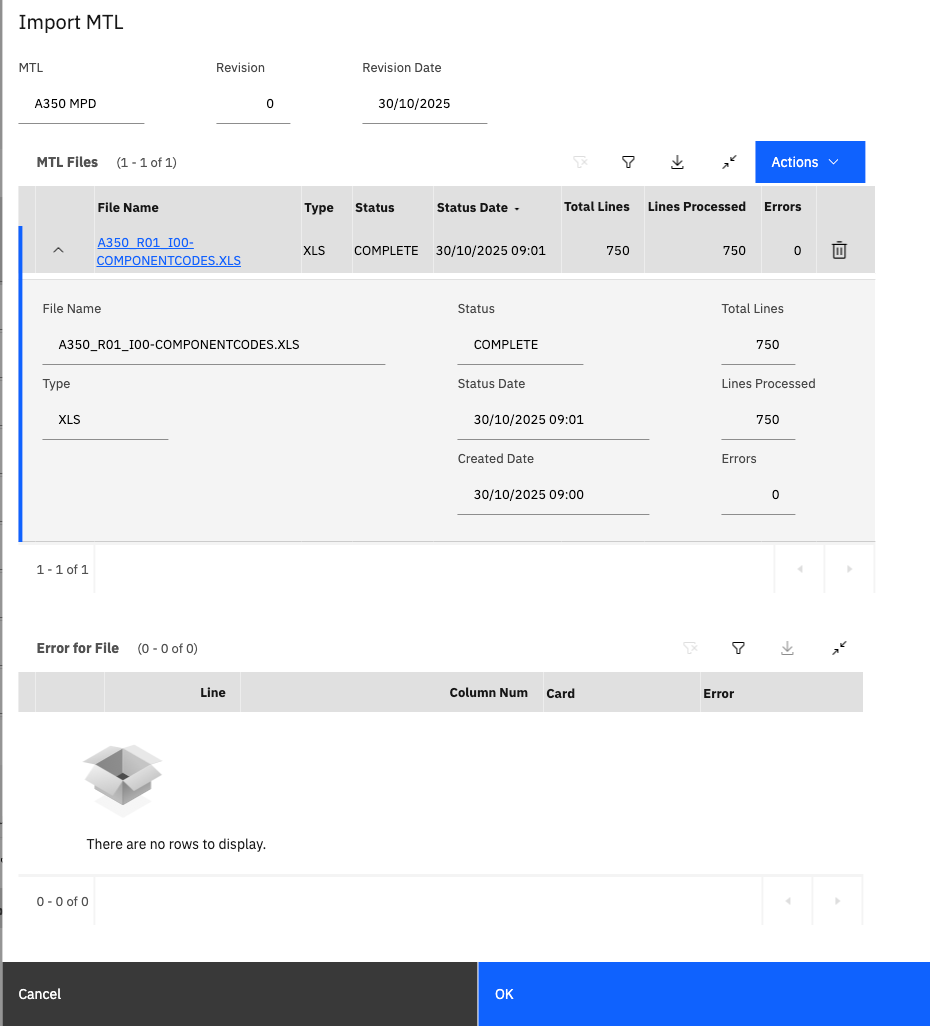
The Import MTL dialog displays detailed error information:
| Field | Description |
|---|---|
| Total Lines | Total number of rows in the file |
| Lines Processed | Number of rows successfully processed |
| Errors | Number of rows with errors |
| Status | Overall import status (COMPLETE, ERROR, IN PROGRESS) |
Error Details Table:
For each error encountered, the system provides:
- Line - Row number in the Excel file
- Column Num - Column number where error occurred
- Card - Task number or identifier
- Error - Description of the error
Common Import Errors:
| Error | Cause | Resolution |
|---|---|---|
| Required field missing | Task number or code not provided | Add missing data to Excel file |
| Invalid data type | Text in numeric field | Correct data type in Excel file |
| Invalid task code | Unrecognized task code | Use valid task code from list |
| Duplicate task number | Task number already exists | Remove duplicate or update existing |
| Invalid ATA chapter | ATA code format incorrect | Use standard ATA format (XX-XX) |
| Invalid calendar unit | Unrecognized unit | Use DAYS, MONTHS, or YEARS |
If the import completes with 0 errors, all tasks were successfully imported and are ready for review. If errors are present, correct the Excel file and re-import.
Post-Import Activities
After successful import:
-
Review Imported Tasks
- Navigate to MTL Tasks tab
- Verify task count matches expected number
- Spot-check task details for accuracy
- Review modification types (R, N, D)
-
Validate Task Data
- Check frequency definitions
- Verify ATA chapter assignments
- Confirm skill assignments
- Review phase associations
-
Handle Errors
- Export error report if needed
- Correct errors in source Excel file
- Re-import corrected file
- Verify error resolution
-
Update MTL Status
- Change status from DRAFT to VALID when approved
Task Frequency Configuration
Each MTL task can have one or more frequency definitions that specify when the maintenance task must be performed. Frequencies can be based on a meter such as flight hours or flight cycles, calendar time, or combinations thereof.
Frequency Types
Meter-Based Frequencies:
- Flight Hours (FH) - Based on accumulated flight time
- Flight Cycles (FC) - Based on takeoff/landing cycles
- Engine Hours (EH) - Based on engine operating time
- APU Hours (AH) - Based on APU operating time
Calendar-Based Frequencies:
- Days - Calendar days elapsed
- Months - Calendar months elapsed
- Years - Calendar years elapsed
Combined Frequencies:
- Tasks can have both meter and calendar frequencies
- Task becomes due when either threshold is reached (whichever occurs first)
- Common for critical inspections and time-change items
Frequency Configuration Fields
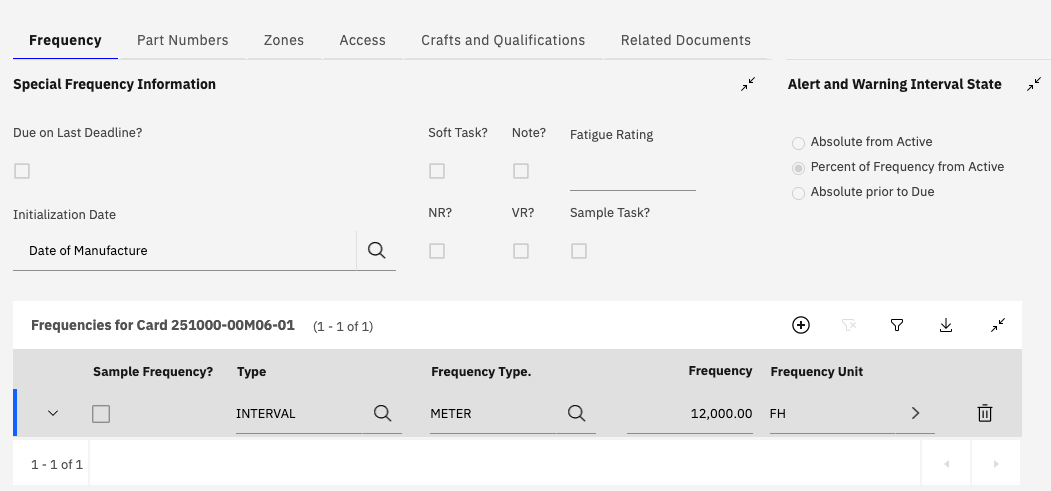
Special Frequency Information:
| Field | Description | Usage |
|---|---|---|
| Due on Last Deadline? | Task due on last applicable deadline | Checked for critical tasks |
| Soft Task? | Task can be performed later than deadline without safety impacts | Checked for flexible tasks |
| Note? | Task has special notes or instructions | Checked when notes exist |
| Fatigue Rating | Fatigue sensitivity rating | Numeric value |
| Initialization Date | Event that starts frequency counting | Date of Manufacture |
| NR? | National Requirement | Checked for tasks which have been indicated as required by a civil aviation authority |
| VR? | Vendor requirement | Checked for tasks where the Vendor has indciated this is a mandatory task |
| Sample Task? | Task is a sample/statistical task | Checked for sampling program tasks |
Alert and Warning Interval State:
Defines when warnings are issued before task becomes due:
| Option | Description |
|---|---|
| Absolute from Active | Fixed time after task becomes active (typically based on last completion date) |
| Percent of Frequency from Active | Percentage of interval |
| Absolute prior to Due | Fixed time before due |
Frequency Definition Table
The Frequencies table shows all interval definitions for the task:
| Field | Description | Example |
|---|---|---|
| Sample Frequency? | Whether this is a sampling frequency | Checked/Unchecked |
| Type | Frequency type | INTERVAL, CALENDAR |
| Frequency Type | Meter or calendar basis | METER, CALENDAR |
| Frequency | Interval value | 12,000.00 |
| Frequency Unit | Unit of measure | FH, FC, MONTHS |
Frequency Examples:
| Task Type | Frequency Definition | Description |
|---|---|---|
| A-Check | 500 FH or 90 Days | Whichever occurs first |
| C-Check | 12,000 FH or 72 Months | Major inspection |
| Daily Inspection | 1 Day | Every calendar day |
| Engine Overhaul | 20,000 EH | Time between overhauls |
| Landing Gear | 10,000 FC | Based on cycles |
| Life Limited Part | 25,000 FH | Mandatory replacement |
When multiple frequencies are defined for a task, the system tracks all of them and the task becomes due when any frequency threshold is reached. This ensures compliance with the most restrictive requirement.
Threshold and Tolerance
Threshold (Warning Point):
- Advance warning before task becomes due
- Allows time for planning and scheduling
- Typically 10-20% of the interval
- Example: 500 FH threshold for 5,000 FH interval
Tolerance (Grace Period):
- Allowable extension beyond due point
- Provides scheduling flexibility
- Must comply with regulatory limits
- Example: +50 FH tolerance after due
Initial vs. Recurring Intervals:
- Initial Interval - First interval after installation or overhaul
- Recurring Interval - Standard interval for subsequent occurrences
- Initial intervals often shorter to detect early issues
Additional Task Information
The MTL application provides several additional tabs for comprehensive task documentation:
Part Numbers Tab
Associates specific part numbers with the task:
- Links task to components that require the maintenance
- Supports multiple part numbers per task
- Enables part-specific task applicability
- Facilitates material planning
If the Part Numbers for an MTL Tasks are not specified then the Master Task Card created from it within the OMP will be linked to the Aircraft Part Numbers (as defined within the Model).
Use Cases:
- Component overhaul tasks
- Part-specific inspections
Zones Tab
Defines aircraft zones where the task is performed:
- Organizes tasks by physical location
- Supports access planning
- Enables zone-based work packaging
Zone Examples:
- 100 - Nose section
- 200 - Forward fuselage
- 300 - Center fuselage
- 400 - Aft fuselage
- 500 - Wings
- 600 - Empennage
Aircraft Zones are defined within the separate "Zones" application.
Access Tab
Documents access requirements for the task, such as:
- Panels that must be removed
- Doors that must be opened
- Special access equipment needed
- Access time estimates
Access Information:
- Access panel numbers
- Opening /Closing and Total Access Time
Crafts and Qualifications Tab
Specifies required skills and qualifications:
- Maintenance trades required
- Certification requirements
- Special qualifications needed
- Training prerequisites
Craft Examples:
- Airframe (AF)
- Avionics (AV)
- Electrical (EL)
- Powerplant (PP)
- Sheet Metal (SM)
Each Craft must be associated with and Aircraft Zone where the work will take place.
Related Documents Tab
Links supporting documentation to the task:
- Technical manuals
- Service bulletins
- Engineering orders
- Work instructions
- Illustrated parts catalogs
Managing MPD Revisions
Aircraft manufacturers periodically issue new revisions of their Maintenance Planning Documents. The MTL application supports managing multiple MPD revisions and tracking changes between revisions.
Revision Management Strategy
New MTL Record per Revision
- Create a new MTL record for each MPD revision
- Import new revision data using the Import File action
- New, revised, and deleted tasks should be specified within the file imported using the first column "Rev Code"
Carefully review all tasks marked with modification type "R" (Revised) or "D" (Deleted) to understand the impact on your maintenance program and updating Master Task Cards.
Related Documentation:
- Master Task Cards Application
- Operators Maintenance Program (OMP)
- Part Number Master
- Loading Data with MXLoader
Additional Resources:
- MTL import file format specification
- MPD data mapping guidelines
- Frequency configuration best practices
- Revision management procedures
- Task code reference guide