Models
Overview
A model defines the engineering reference data and the allowable configuration for a type of complex asset.
It's used:
- To defined the allowable configuration for a type of complex asset and possibly variants of that asset type.
- As a template from which to build asset hierarchies used to maintain assets of the type described by the Model.
- By the BDI to validate the as maintained configuration of the asset against its allowable configuration described by the Model (and highlights problems).
Models Main Page
The Models main page contains general information about the Model and fields which control it's definition.
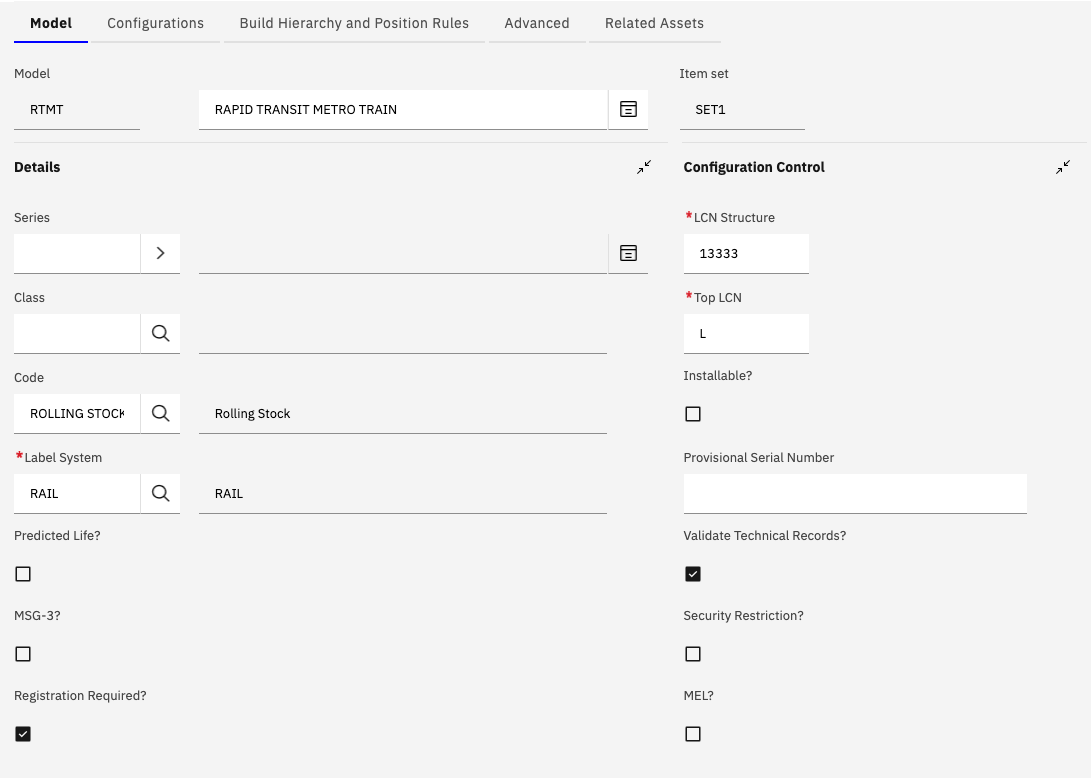
Detailed Field Information
General fields
| Field Name | Description | Example Value |
|---|---|---|
| Model | The name of the Model with associated Description | RTMT |
| Item Set | The Item Set to which the Model belongs. Models and CM Items are Item Set level objects due to their relationship with inventory | SET1 |
| Series | The Series to which the Model belong. Models can optionally linked to a Series if there are a number of Models belonging to the Series. | A SERIES |
| Class | The Class of Model eg LOCOMOTIVE. For information only and has no impact on system functionality. | LOCOMOTIVE |
| Code | A Code for the Model type eg. ROLLING STOCK. USed to indicate general asset type. For information only and has no impact on system functionality. | ROLLING STOCK |
| Label System | Used to indicate the system of labels used to identify a build position. For example, ATA, UIN or WUC. | RAIL |
| Predicted Life | If set to true the system will attempt to calculate the current life of an asset based on past utiliziation. This is useful in very specific circumstances. Recommendation is to set to false (the default). | N |
| MSG-3? | MSG-3 is a standard used in commerical aviation maintenance. When set to true additional fields related to this standard become available as part of a build position definition | N |
| Registration Required? | When set to true the user will be forced to enter a Registration value for the top level asset when creating an asset from this Model in the New Asset Assemblies (CM) application | Y |
Configuration Control fields
| Field Name | Description | Example Value |
|---|---|---|
| LCN Structure | Used to determine the format of LCN values used in the build hierarchy definition. LCN values are a unique value for each position in the build hierarchy and are also used to determine the parent/child relationship between build positions | 1 (defaults to 1444444) |
| Top LCN | The character(s) used for the top LCN value in the Models build hierarchy. | L |
| Installable | Indicates whether the Model is installable or not. Installable Models can be referenced by Build Positions marked as installation points in a parent Model. Sub Models are most often used when a complex sub assembly is used in multiple positions within a model or within multiple models. For example an engine. | Y or N |
| Provisional Serial Number | The value is used by the BDI validation which determines if multiple assets share the same CM Item and Serial number. If the serial number of the asset is the same as the provisional serial number value it will not be considered as part of the logic which determines assets with duplicate CM Items/Serial Numbers | TBC, TBD, UNKNOWN etc |
| Validate Technical Records? | Used to control whether the BDI will interpret, validate and take action on Technical Records related to the Model and assets created from the Model. | Y or N |
| Security Restriction? | Used to control who can access the Model and Assets created from it. If set to Y the Model must be added to the users Security Group in order for them to continue to be able to access it. | N |
| MEL? | Indicates if the Model defines a Mininum Equipment List. a MEL can be used to determine if the Asset is in valid configuration based on a minimum number of required items that must be installed and operational (servicable) | N |
Build Items, Label and CM Items
The Build Items are a list of the main components (typically tracked and serialized) that are then used to create a build hierarchy representing the physical structure of the complex asset.
They are related to one or more labels (typically one) and one or more CM Items which represent parts which provide the same fit, form and function of the component.
Each Build Item records name must be unique within the Model it is contained within.
When defining the Build Items and Build Hierarchy of a Model it is recommended that it is defined to the level at which it needs to be tracked and maintained in practice. Over-engineering an ACM model definition can lead to performance issues, user frustration, and increased maintenance overhead.
The goal should be to model only what needs to be controlled or validated, and no more. Always try to balance precision with usability.
Build Item fields
| Field Name | Description | Example Value |
|---|---|---|
| Build Item | The name of the Build Item. Must be unique within the Model it is contained within. | STARTER GENERATOR |
| Category | The category of the Build Item for example HARDWARE or SOFTWARE. Value is optional | HARDWARE |
| Icon | An image file name. The image will be displayed in the Build and Asset Hierarchy for each node created from the Build Item. The image file names must be incorporated into the maximo.ear file by way of a customization archive. | starter-generator.gif. |
Label fields
Labels are used (together with build item name and position value) to allow a user to easily identify a position within a complex asset hierarchy.
| Field Name | Description | Example Value |
|---|---|---|
| Label Systen | The name of the Build Item. Must be unique within the Model it is contained within. | RAIL |
| Label | The label used as part of the build hierarchy definition. If a Build Item has multiple labels then a unique Default for Position value should be specific for each. This is so the system can identify which label to use for each build postion created from the build item. | 10-00 |
| Default for Pos | A position value associated with the label. Used to determine which label to display for a build position | LEFT |
CM Item Fields
| Field Name | Description | Example Value |
|---|---|---|
| CM Item | The CM Item related to the selected Build Item. Multiple CM Items, which provide the same fit, form and function, can be related to each Build Item. By default these are two-way interchangeable with each other | |
| Default? | One CM Item related to a Build Item can be marked as the default. When creating an asset hierarchy from the Model, within the New Asset Assemblies (CM) application, the default CM Item will be chosen for a sub assmebly asset. This is unless it has been marked as not-applicable to the Variant of the Model being created. | Y or N |