Build Hierarchy Overview
Overview
The Build Hierarchy and Position Rules tab is used to define the physical structure of the Model and the configuration rules which form part of the allowed configuration. It allows the definition and visualisation of the parent/child relationship between the Build Positions.
Build Hierarchy
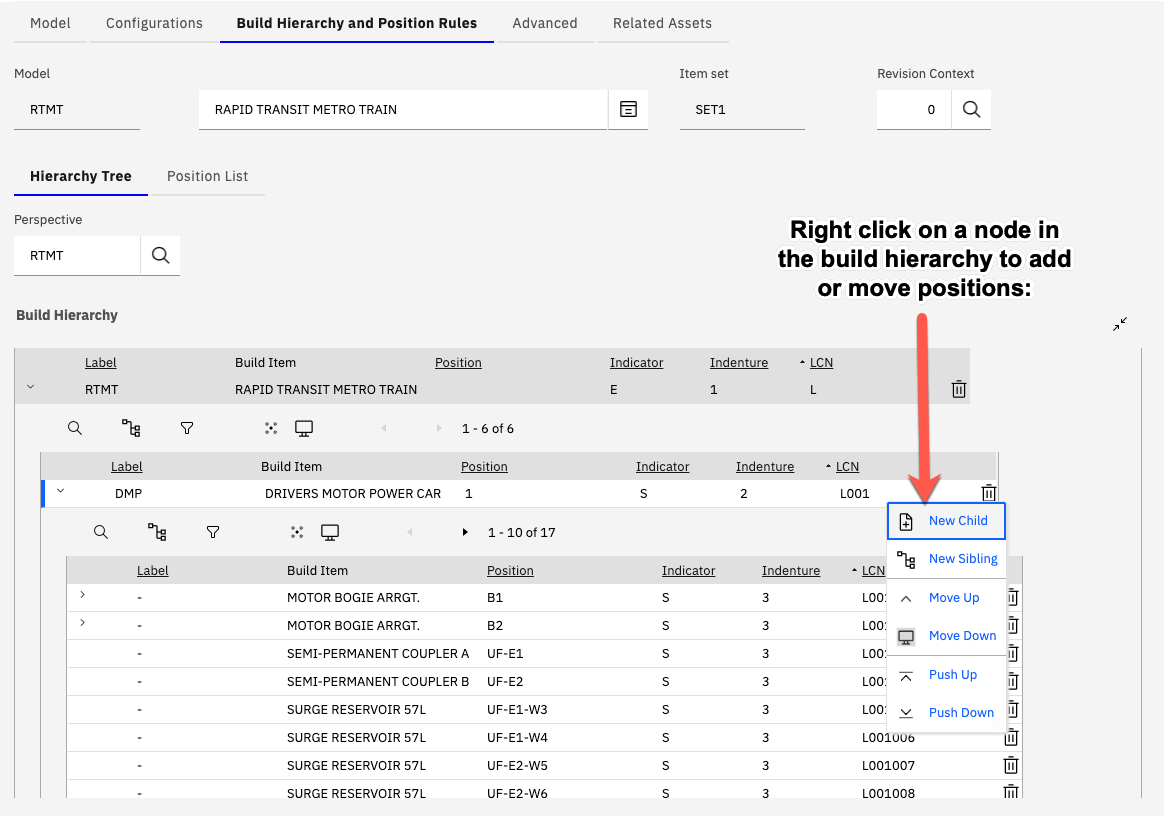
The image below shows an example Build Hierarchy, formed from the Models Build Items, for a Rapid Transit Metro Train:
Adding a New Position
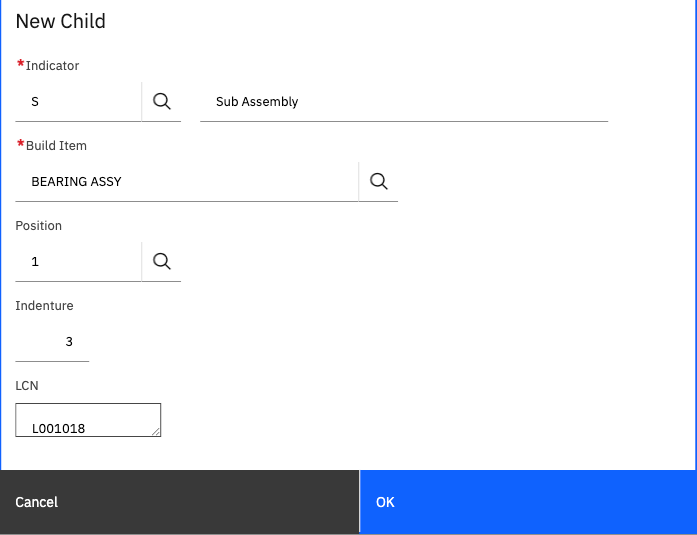
New positions can be added to the Model by right clicking a node and selecting the option "New Child" or "New Sibling". The dialog which is opened allows the user to specify the attributes for the new position:
Detailed Field Information
| Field Name | Description | Example Value |
|---|---|---|
| Indicator | The type of position. A more detailed description of the indicator values are detailed below | S |
| Build Item | Each Build Position is constructed from a Build Item representing the sub assembly/component that must be tracked, managed and maintained | BEARING ASSY |
| Position | A Position value which when combined with the Build Item and Label can be used by the user to easily identify the build position | LEFT |
| Indenture | The level of indenture within the Build Hierarchy that the position resides (read only and system generated based on where the position is added) | 2 |
| LCN | A Logistic Control Number (LCN) that is used by the system to uniquely identify a build position within the current Model. The LCN value is also used to determine the parent/child relationship between positions in the Build Hierarchy | L0001 |
Altering the Build Hierarchy
Positions can be freely added, moved (using the Move Up/Down and Push/Up down) or deleted from the Build Hierarchy in the situation where NO Assets have been created from the Model.
Once Assets are created from the Model then restrictions are imposed in terms of the movement of Build Positions.
This is enforced as the LCN value of a position is used, as part of the Assets as maintained configuration history, to record which assets have been installed into a position over the assets lifecycle.
If assets have been created then it is possible to add new positions (with new, unique, unused LCN values) and also delete build positions.
Deleting Positions
Positions can be deleted by the use of the trash can icon at the end of the build position node.
In the case where a build position is deleted after assets have been created from the Model a record is created to record that the associated LCN value has been previously used for this Model.
When new Build Positions are added these previously used LCN values are by default "skipped" when generating the LCN value for the new position.
Previously used LCN values can be viewed and managed using the action "View Used Build Position LCNs". Records can be deleted from the "used" list if there is a specific requirement to re-use them.