Flight Log Book Setup
Overview
The Flight Log Book Setup application in Maximo Aviation defines the configuration templates for Flight Log Books used for one or more aircraft.
Th application establishes the operational parameters, meter configurations, fuel tank definitions, and automation rules that will be applied to individual Flight Log Books created for specific aircraft.
Purpose:
Flight Log Book Setup serves as the master configuration that:
- Defines which aircraft models and configurations use specific flight log book types
- Establishes meter reading requirements and forecast amounts
- Configures fuel tank definitions and capacities
- Sets up engine tracking parameters
- Controls discrepancy and work order automation
- Determines post-flight inspection requirements
- Manages replenishment tracking
Key Concepts:
| Concept | Description |
|---|---|
| Flight Log Book Type | A unique identifier for a specific flight log book configuration template |
| Applies To | Defines which aircraft models and configurations use this setup |
| Revision Control | Tracks changes to flight log book configurations over time |
| Associated Flight Log Books | Individual flight log books created from this setup for specific aircraft |
Flight Log Book Setup is a template-based system. Changes to the FLB Setup affect new Flight Log Books created from the template.
If the the FLB Setup is revised, modified and the new revision made active, then any existing Flight Log Books created from it will need to have the new revision applied manually.
This is performed using an action "Change Flight Log Book Type" within the Flight Log Book application. The action can be called from the List tab to allow multiple Flight Log Books to be updated in one action.
Application Access:
- Application Name: Flight Log Book Setup
- Application Code: PLUSAFLBSETUP
- Navigation: Go To → Flight Operations → Flight Log Book Setup
Configuration
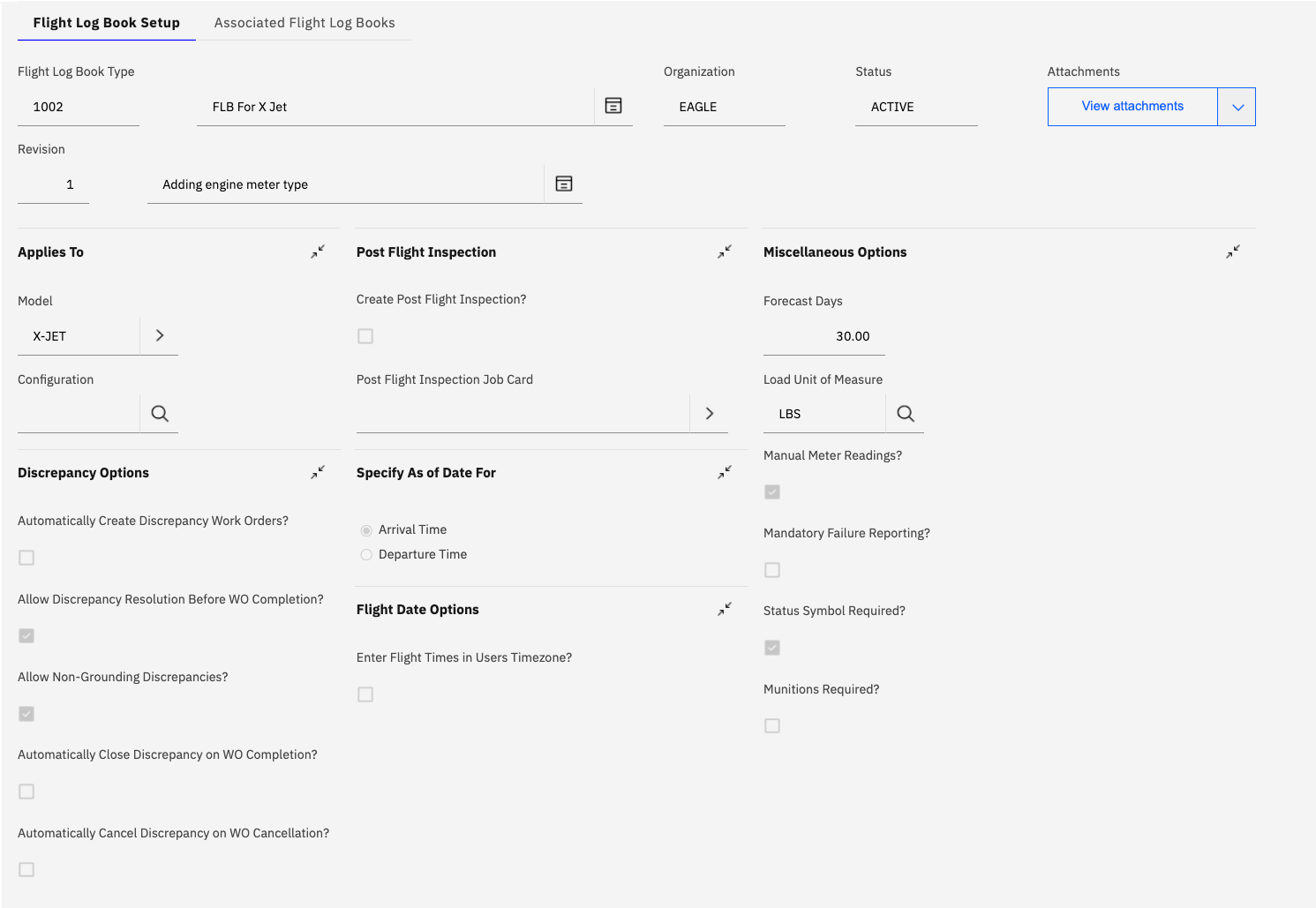
The Configuration section defines the core operational parameters for Flight Log Books created from this setup.
Applies To
The Applies To section determines which aircraft models and configurations will use this Flight Log Book Setup.
Fields:
| Field | Description | Required |
|---|---|---|
| Model | Aircraft model (e.g., X-JET, A320, B737) | Yes |
| Configuration | Specific aircraft configuration variant | No |
Configuration Logic:
When a new Flight Log Book is created for an aircraft:
- System checks the aircraft's model
- If a configuration is specified, system checks for exact match
- If configuration is blank, setup applies to all configurations of that model
- Most specific match (model + configuration) takes precedence
Example Scenarios:
| FLB Setup Model | Setup Configuration | Aircraft Model | Aircraft Config | Match? |
|---|---|---|---|---|
| X-JET | (blank) | X-JET | Standard | Yes - applies to all X-JET configs |
| X-JET | Extended Range | X-JET | Extended Range | Yes - exact match |
| X-JET | Extended Range | X-JET | Standard | No - config mismatch |
| A320 | NEO | A320 | CEO | No - config mismatch |
If multiple Flight Log Book Setups match an aircraft (e.g., one with blank configuration and one with specific configuration), the system uses the most specific match.
Post Flight Inspection
The Post Flight Inspection section controls automatic generation of post-flight inspection work.
Create Post Flight Inspection?
When enabled, the system automatically creates a post-flight inspection work order with the specified job card after each flight is completed.
Configuration:
| Field | Description | Impact |
|---|---|---|
| Create Post Flight Inspection? | Checkbox to enable/disable automatic creation | Controls whether inspection work is generated |
| Post Flight Inspection Job Card | Job Card to use for the inspection | Defines the work to be performed |
Post Flight Inspection Workflow:
Flight Data record created
    ↓
System checks "Create Post Flight Inspection?" setting
    ↓
If enabled:
    ↓
System creates Work Order using specified Job Card and aircraft status is changed to GROUNDED
    ↓
Work Order assigned to aircraft
    ↓
Inspection must be completed before flight can be closed and aircraft returned to service
Post-flight inspections are a critical safety control. Enable this feature for all operational aircraft to ensure consistent inspection practices and regulatory compliance.
Discrepancy Options
The Discrepancy Options section controls automation of work order creation and management of discrepancies reported during flight operations.
Configuration Options:
| Option | Description | Impact |
|---|---|---|
| Automatically Create Discrepancy Work Orders? | Creates WO immediately when discrepancy is logged | Ensures all discrepancies are tracked in work management |
| Allow Discrepancy Resolution Before WO Completion? | Permits closing discrepancy before associated work order is completed | Provides flexibility for operational deferrals |
| Allow Non-Grounding Discrepancies? | Permits discrepancies that don't ground the aircraft | Typically for issues with no flight safety impact |
| Automatically Close Discrepancy on WO Completion? | Closes discrepancy when work order is completed | Maintains synchronization between discrepancy and work orders. Discrepancies marked as requiring independent inspection (RII) are not automatically closed. |
| Automatically Cancel Discrepancy on WO Cancellation? | Cancels discrepancy when work order is cancelled | Handles false reports or duplicate entries |
Discrepancy Automation Workflow:
Discrepancy Reported in Flight Log Book
    ↓
If "Automatically Create Discrepancy Work Orders?" = Yes
    ↓
System creates Work Order
    ↓
Work Order linked to Discrepancy
    ↓
Work Order completed
    ↓
If "Automatically Close Discrepancy on WO Completion?" = Yes
    ↓
Discrepancy Status automatically changed to RTS (Return to Service)
Flight Date Options
The Flight Date Options section controls how flight times and dates are captured and displayed in the Flight Log Book.
Specify As of Date For:
Determines which time is used as the official "Reading Date" for meter readings created through the Flight Data record:
| Option | Description | Use Case |
|---|---|---|
| Arrival Time | Uses the flight arrival time as the official date/time | Most common - meters read at end of flight |
| Departure Time | Uses the flight departure time as the official date/time | Special cases where departure time is critical |
Most operators use Arrival Time as the "as of" date because meter readings (flight hours, cycles) are typically recorded at the end of the flight. This ensures maintenance tracking is based on actual accumulated usage.
Enter Flight Times in Users Timezone?
Controls whether flight times are entered in the user's local timezone or in UTC:
| Setting | Behavior | Example |
|---|---|---|
| Enabled | User enters times in their local timezone, system converts to UTC | User in EST enters "14:00", system stores as "19:00 UTC" |
| Disabled | User enters times in UTC directly | User enters "19:00 UTC" regardless of local time |
Miscellaneous Options
The Miscellaneous Options section contains additional configuration parameters that control Flight Log Book behavior.
Configuration Fields:
| Field | Description | Default | Impact |
|---|---|---|---|
| Forecast Days | Number of days to forecast meter readings | 30.00 | Controls planning horizon for the "short forecast" displayed on the "Aircraft Status" -> "Schedule Inspection Information" tab |
| Load Unit of Measure | Unit for weight/load calculations | LBS or KG | Determines weight units throughout flight log book |
| Manual Meter Readings? | Allow manual entry of meter readings | Unchecked | Enables/disables manual meter entry (described in the FLB Topic) |
| Mandatory Failure Reporting? | Require failure reporting for discrepancies | Unchecked | Forces failure class / codes entry on a discrepancy before it can be closed |
| Status Symbol Required? | Displays a status symbol icon within FLB which depends on most severe discrepancy status | Checked | Icon displayed on List tab and main FLB screens |
| Munitions Required? | Track munitions usage in flight log book | Unchecked | Enables munitions tracking (military) |
Engines
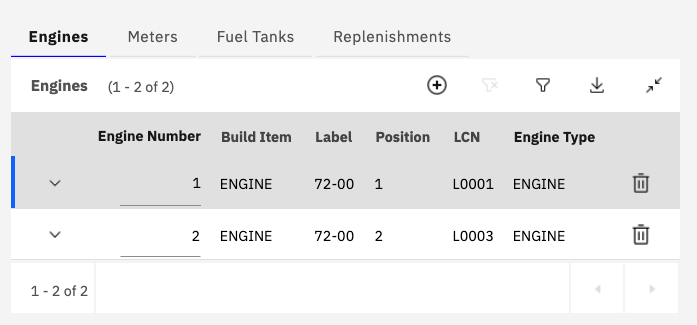
The Engines tab defines the engine positions and tracking parameters for aircraft using this Flight Log Book Setup.
Purpose:
The Engines configuration:
- Defines how many engines the aircraft has
- Establishes engine position numbering
- Links engines to build items in the aircraft model
- Provides engine-specific meter tracking
Engine Configuration Fields:
| Field | Description | Required | Example |
|---|---|---|---|
| Engine Number | Sequential engine number (1, 2, 3, etc.) | Yes | 1 |
| Build Item | Build item from aircraft model representing the engine | Yes | ENGINE |
| Label | Model label for the engine position | Yes | 72-00 |
| Position | Physical position identifier | Yes | 1 |
| LCN | Logistics Control Number for the engine | Yes | L0001 |
| Engine Type | Type classification for the engine | Yes | ENGINE or APU |
Example Configuration:
For a twin-engine aircraft (X-JET):
| Engine Number | Build Item | Label | Position | LCN | Engine Type |
|---|---|---|---|---|---|
| 1 | ENGINE | 72-00 | 1 | L0001 | ENGINE |
| 2 | ENGINE | 72-00 | 2 | L0003 | ENGINE |
Engine-Specific Meters:
Engines defined here can have dedicated meters (see Meters tab):
Proper engine configuration is critical for accurate maintenance tracking. Ensure engine positions match your aircraft model's build hierarchy and your organization's engine numbering conventions.
Meters
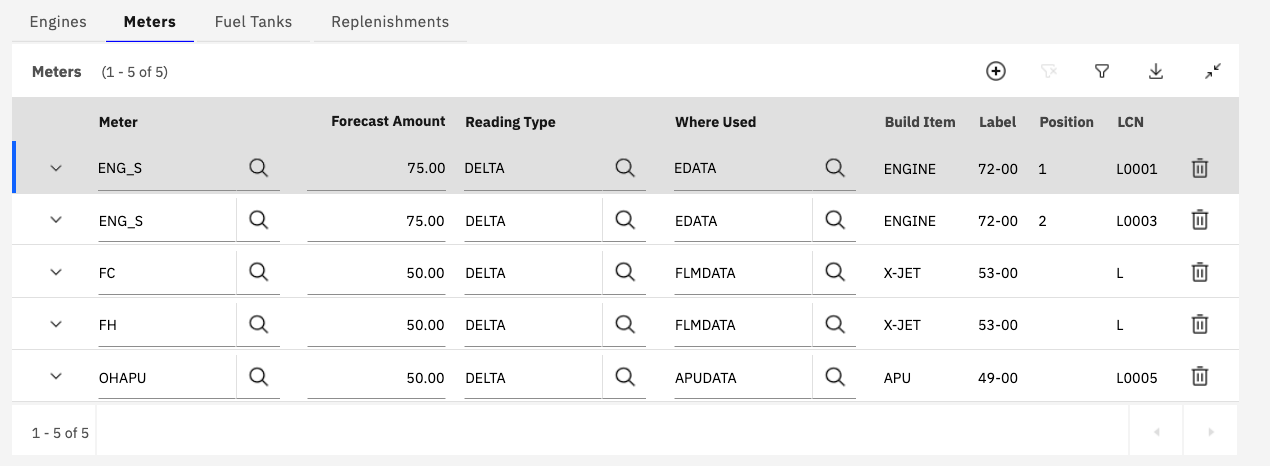
The Meters tab defines the meter readings that will be captured in Flight Log Book - Flight Data records (for FLBs created from the this FLB Setup).
Purpose:
Meter configuration establishes:
- Which meters are tracked for the aircraft
- Forecast amounts for Scheduled Inspection Information "short forecast" display
- Meter Entry Type which determines if meter reading value is automatically calculated (for Flight Hours or Block Time meters) or manually entered
- Reading types (DELTA vs. ACTUAL)
- Where meter data is displayed (Engine Data - EDATA, Flight Meter Data - FLMDATA, APUDATA)
- Relationship to build items and positions
Meter Configuration Fields:
| Field | Description | Required | Example |
|---|---|---|---|
| Meter | Meter name (Meters are defined in the "Meters" application) | Yes | FH |
| Forecast Amount | Amount of units for Task Cards to be displayed in Schedued Inspection Information | Yes | 50.00 |
| Reading Type | DELTA (incremental) or CONTINUOUS (cumulative) | Yes | DELTA |
| Meter Entry Type | Determines how meter value is calculated or whether it is entered manually. | Yes | FLTHRS, BLKTIME, METER |
| Where Used | Table on the Aicraft Status tab where meter information summary is displayed:(Flight Meter Data, Engine Data or APU Data) | Yes | FLMDATA, EDATA, APUDATA |
| Build Item | Build item this meter applies to | No | X-JET |
| Label | Model label for the build item | No | 53-00 |
| Position | Position identifier | No | (blank) |
| LCN | Logical Configuration Number | No | L |
Forecast Amount:
The forecast amount is used to determine which Task Cards appear on the "short forecast" displayed on Aicraft Status -> Scheduled Inspection Information: The estimated due date for a Task Card is calculated based on number of meter units remaining and the average for the meter in question.
Reading Types:
| Type | Description | Example | Use Case |
|---|---|---|---|
| DELTA | Incremental reading (amount used during flight) | Flight used 2.5 FH | Most common - tracks usage per flight |
| CONTINUOUS | Cumulative reading (total accumulated) | Total FH now 10,250.5 | Less common - tracks absolute values |
Meter Entry Type:
| Table | Description | Typical Meter |
|---|---|---|
| FLTHRS | Meter Reading value is auto calculated from Flight Data arrival and departure date/times | FH |
| BLKTIME | Meter Reading value is auto calculated from Flight Data off/on block date/times | BLKTIME |
| METER | Meter reading is entered manually in the Meters section of the Flight Data record | Flight Cycles, Engine Hours, APU Starts |
Where Used:
| Table | Description | Typical Meters | Scope |
|---|---|---|---|
| FLMDATA | Displayed on "Flight Meter Data" tab of Flight Log Book | FH, FC, LANDINGS | Aircraft-level meters |
| EDATA | Displayed on "Engine Data" tab of Flight Log Book | ENG_S, ENG_C, ENG_STARTS | Engine-specific meters |
| APUDATA | Displayed on "APU History" tab of Flight Log Book | OHAPU, APU_C, APU_STARTS | APU-specific meters |
Example Meter Configurations:
Aircraft-Level Meters:
| Meter | Forecast | Meter Entry Type | Where Used | Type | Build Item | Description |
|---|---|---|---|---|---|---|
| FH | 50.00 | FLTHRS | FLMDATA | DELTA | X-JET | Flight Hours |
| BH | 75.00 | BLKTIME | FLMDATA | DELTA | X-JET | Flight Cycles |
| FC | 20.00 | METER | FLMDATA | DELTA | X-JET | Flight Cycles |
| TG | 10.00 | METER | FLMDATA | DELTA | X-JET | Touch and Gos |
Engine-Specific Meters:
| Meter | Forecast | Meter Entry Type | Type | Where Used | Build Item | Position | LCN | Description |
|---|---|---|---|---|---|---|---|---|
| ENG_HRS | 75.00 | METER | DELTA | EDATA | ENGINE | 1 | L0001 | Engine 1 Hours |
| ENG_HRS | 75.00 | METER | DELTA | EDATA | ENGINE | 2 | L0002 | Engine 2 Hours |
APU Meters:
| Meter | Forecast | Meter Entry Type | Type | Where Used | Build Item | LCN | Description |
|---|---|---|---|---|---|---|---|
| OHAPU | 50.00 | METER | DELTA | APUDATA | APU | L0005 | APU Operating Hours |
Meter Relationships:
Aircraft (X-JET)
├── FH (Flight Hours) → FLMDATA
├── FC (Flight Cycles) → FLMDATA
├── Engine 1 (L0001)
│   └── ENG_S (Engine Hours) → EDATA
├── Engine 2 (L0003)
│   └── ENG_S (Engine Hours) → EDATA
└── APU (L0005)
    └── OHAPU (APU Hours) → APUDATA
Engine-specific meters (like ENG_S) must have separate entries for each engine position. This enables independent tracking of each engine's usage and maintenance requirements.
Implementation Guidance:
- Define Standard Meters: Establish organization-wide meter definitions before configuring Flight Log Book Setup
- Forecast Accuracy: Set forecast amounts based on typical flight profiles for the aircraft type
- Engine Meters: Always create separate meter entries for each engine position
- APU Tracking: Include APU meters if APU usage affects maintenance requirements
- Data Tables: Use correct "Where Used" table to ensure data is displayed properly
- Testing: Verify meter readings flow correctly from Flight Log Book to maintenance tracking
Fuel Tanks
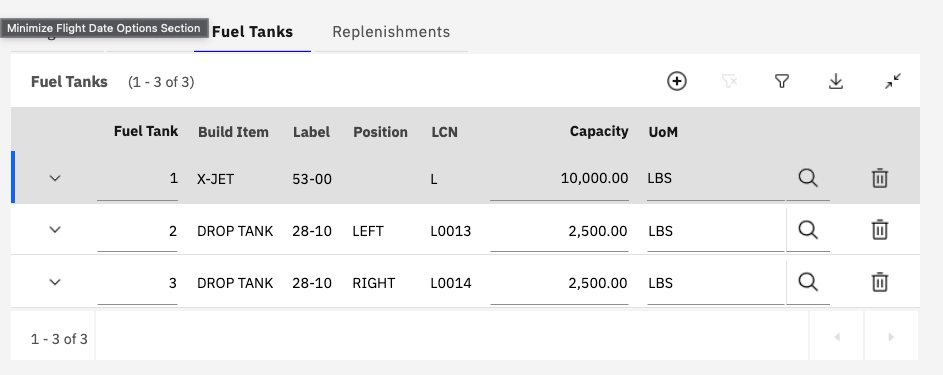
The Fuel Tanks tab defines the fuel tank configuration for aircraft using this Flight Log Book Setup.
Purpose:
Fuel tank configuration:
- Defines the number and location of fuel tanks
- Establishes tank capacities
- Links tanks to build items in aircraft model
- Enables fuel replenishment recording
Fuel Tank Configuration Fields:
| Field | Description | Required | Example |
|---|---|---|---|
| Fuel Tank | Sequential tank number | Yes | 1 |
| Build Item | Build item from aircraft model | Yes | X-JET |
| Label | Model label for the tank position | Yes | 53-00 |
| Position | Physical position identifier | No | L |
| LCN | Logical Configuration Number | No | L |
| Capacity | Maximum fuel capacity | Yes | 10,000.00 |
| UoM | Unit of Measure for capacity | Yes | LBS |
Example Configuration:
For an X-JET aircraft with main tank and drop tanks:
| Fuel Tank | Build Item | Label | Position | LCN | Capacity | UoM |
|---|---|---|---|---|---|---|
| 1 | X-JET | 53-00 | L | L | 10,000.00 | LBS |
| 2 | DROP TANK | 28-10 | LEFT | L0013 | 2,500.00 | LBS |
| 3 | DROP TANK | 28-10 | RIGHT | L0014 | 2,500.00 | LBS |
Capacity and Unit of Measure:
- Capacity: Maximum fuel capacity for the tank
- UoM: Must match the Load Unit of Measure in Miscellaneous Options
- Total Capacity: Sum of all tank capacities = maximum aircraft fuel capacity
- Weight Calculation: Fuel weight = Capacity × Fuel Density
Replenishments
The Replenishments tab defines consumable items that are tracked and replenished during flight operations (e.g., oil, hydraulic fluid, oxygen).
Purpose:
Replenishment configuration:
- Tracks consumable fluids and materials
- Records replenishments after flights
Replenishment Configuration Fields:
| Field | Description | Example |
|---|---|---|
| Name | Name of the Replenishment | Cabin Oxygen Reserve |
| Type | Type of Replenishment | OXYGEN |
| Unit of Measure | Unit for quantity tracking | QT (Quarts) |
| Build Item | Build item this replenishment applies to | ENGINE |
| Position | Position identifier | 1 |
| LCN | Logistics Control Number | 02-74889 |
| Item Issue Search | Number of days which system checks for issues against the Aircraft | 5 |
Common Replenishment Items:
| Item Type | Description | Typical UoM | Build Item | Use Case |
|---|---|---|---|---|
| Engine Oil | Lubricating oil for engines | QT, L | ENGINE | Track oil consumption per engine |
| Hydraulic Fluid | Hydraulic system fluid | QT, L | AIRCRAFT | Monitor hydraulic system health |
| Oxygen | Crew and passenger oxygen | LBS, L | AIRCRAFT | Ensure oxygen availability |
| De-icing Fluid | Anti-ice/de-ice fluid | GAL, L | AIRCRAFT | Track de-icing operations |
| Potable Water | Drinking water | GAL, L | AIRCRAFT | Monitor water system |
Replenishment tracking provides early warning of potential maintenance issues. Increasing oil consumption, for example, may indicate engine wear or seal degradation requiring investigation.
Associated Flight Log Books
The Associated Flight Log Books tab displays all individual Flight Log Books that have been created from this Flight Log Book Setup.
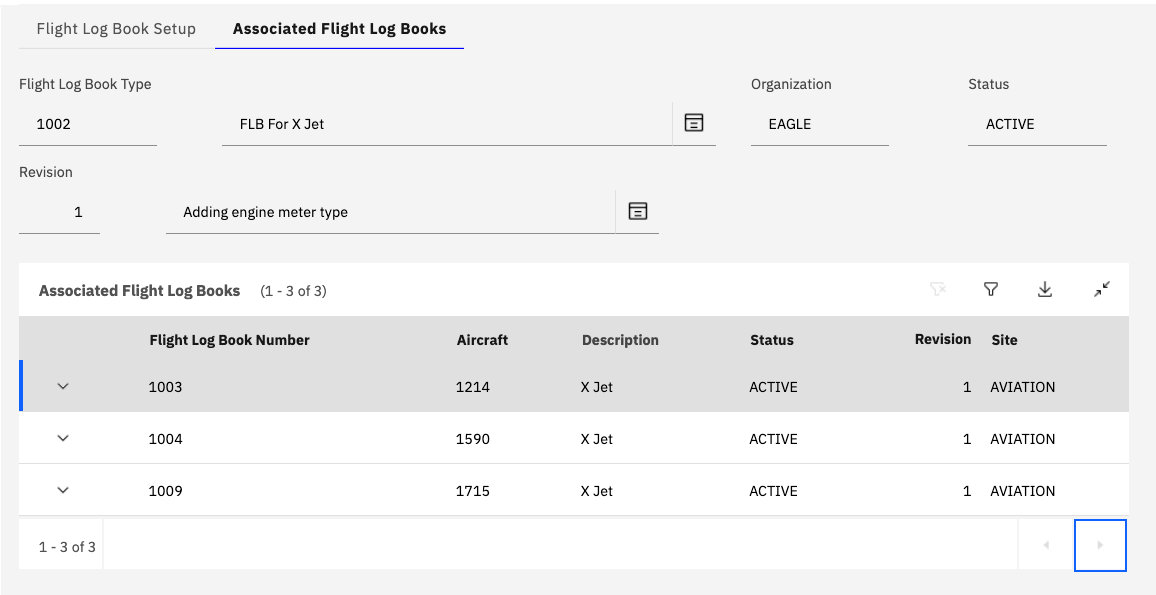
Purpose:
This tab provides:
- Visibility into which aircraft are using this setup
- Quick access to individual Flight Log Books
- Revision tracking for each Flight Log Book
Associated Flight Log Books Fields:
| Field | Description |
|---|---|
| Flight Log Book Number | Unique identifier for the individual Flight Log Book |
| Aircraft | Aircraft asset number using this Flight Log Book |
| Description | Description of the Flight Log Book (typically aircraft tail number or identifier) |
| Status | Current status of the Flight Log Book (ACTIVE, INACTIVE, etc.) |
| Revision | Current revision number of the Flight Log Book |
| Site | Site/location where the Flight Log Book is used |
Flight Log Book Lifecycle:
Flight Log Book Setup Created and Activated
    ↓
Aircraft Added to Fleet
    ↓
User Creates Flight Log Book. FLB Setup record is chosen automatically based on Aicraft configuration
    ↓
Flight Log Book Status is changed to ACTIVE
    ↓
Flight Log Book used for daily operations
    ↓
Aircraft Retired
    ↓
Flight Log Book status changed to INACTIVE
Status Values:
| Status | Description | Use Case |
|---|---|---|
| ACTIVE | Flight Log Book is in use | Normal operational aircraft |
| INACTIVE | Flight Log Book is not in use | Aircraft retired, in storage, or sold |
Revision Management:
Each Flight Log Book is linked to a specific revision of an FLB Setup record:
- Setup Changes: Changes to Flight Log Book Setup don't automatically update existing Flight Log Books
- Manual Updates: Use "Change Flight Log Book Type" action to update a Flight Book record to a new FLB Setup Revision