Asset Installation and Removal Transaction Logic
Overview
This page gives an overview and explanation of the capability and logic used in Maximo Aviation to manage asset install and removal transactions.
The install/remove functionality, provided for configuration-managed assets, is designed in such a way as to record a complete history of the installation and removal history of configuration-managed assets.
It is also designed in such a way as to provide the ability to perform retrospective or out of sequence transactions.
The aim of this documentation is to provide users of Maximo Aviation with guidance as to this logic, how the data is persisted and how it is presented to the user within the ACM interface.
The installation and removal history of configuration-managed assets is persisted in the table:
PLUSASAONOFF
Each individual PLUSASAONOFF record records either:
- A period of time where an asset was installed into a parent assembly.
- A period of time where an asset was NOT installed into a parent assembly.
- A period of time where a specific position within an asset assembly structure was empty.
Due to the way this information is persisted within this table, the system provides the ability to view the sub assembly structure at any point in time (Referred to as the "As of Date") in the assets lifecycle.
PLUSASAONOFF Attributes
A list of the main attributes of the PLUSASAONOFF table is detailed below:
| Attribute Name | Data Type | Description |
|---|---|---|
| ASSETID | BIGINT | The installed Asset identifier. For PLUSASASONOFF records representing periods where a position in a parent assembly was empty this value is NULL. |
| PARENTASSETID | BIGINT | The Parent Asset identifier. For PLUSASASONOFF records representing periods where an Asset was not installed this value is NULL. |
| ONTIME | DATETIME | The date and time at which either: 1. An asset was installed into a parent assembly. 2. The beginning of the period of time where an asset was NOT installed into a parent assembly. 3 The beginning of the period of time for which a position within a parent assembly was empty. The PLUSASAONOFF.ONTIME should be populated on all PLUSASAONOFF records. |
| OFFTIME | DATETIME | The date and time at which either 1. An asset was removed from a parent assembly. 2. The end of the period of time where an asset was NOT installed into a parent assembly. 3 The end of the period of time for which a position within a parent assembly was empty. The PLUSASONOFF.OFFTIME maybe NULL and this represents the "current" data about the asset or position. |
| LABEL | UPPER | The Label of the position |
| POSITION | UPPER | The Position code of the position |
| NAME | UPPER | The Build Item name of the position |
| LCN | UPPER | The LCN of the position |
| CURTOPASSET | BIGINT | The asset identifier of the asset at the top of the current assembly. |
| NONTRACKED | YORN | =1 if the position is flagged as non-tracked in the Models Build Hierarchy. |
| NONSERIALIZED | YORN | =1 if the position is flagged as non-serialized in the Models Build Hierarchy. |
| SOFTWARE | YORN | =1 if the position is flagged as a software position in the Models Build Hierarchy. |
| TYPE | UPPER | The Type of the transaction (described in detail below) |
Installation/Removal Type Value
In order for the system to provide the ability to record installation and removal transactions out of chronological sequence a "Type" value is recorded on each PLUSASAONOFF record.
This is used to signify additional information about the transaction for the purposes of transaction integrity.
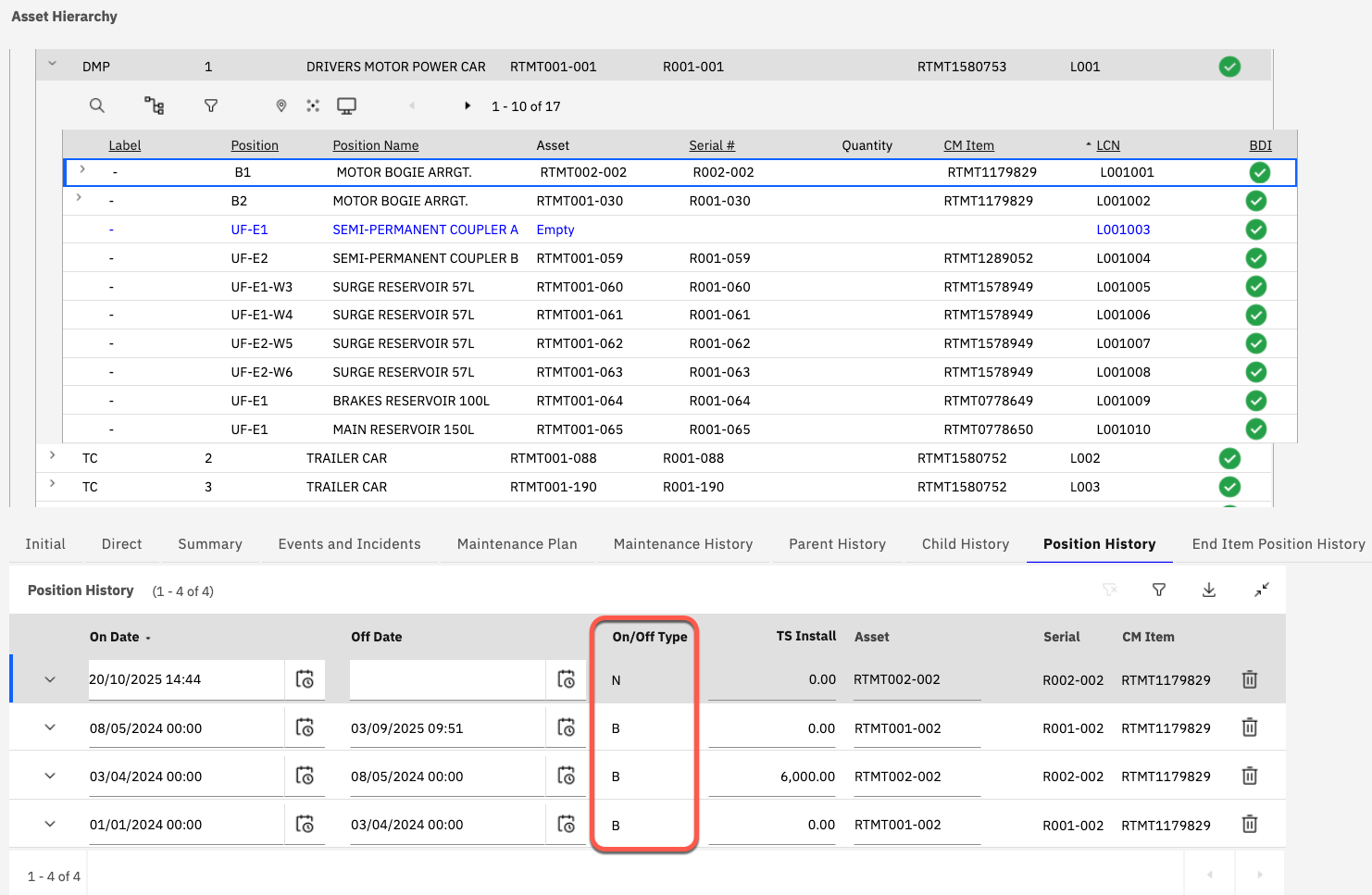
Four possible "Type" values exist:
| Type Value | Description |
|---|---|
| G (Gap) | A PLUSASAONOFF record with a Type=G, represents either: 1. A period of time between 2 dates when a position is empty (PLUSASAONOFF.ASSETID IS NULL) or; 2. A period of time where a sub assembly asset is not installed (PLUSASAONOFF.PARENTASSETID IS NULL). If the Off Time is null on the record with Type=G this reflects that the position is currently empty or the asset is not currently installed. |
| N (Valid On) | Signifies that the date on which the asset was installed (PLUSASAONOFF.ONTIME) into a parent assembly is a confirmed date. I.e. An explicit installation transaction was carried out to install the asset into a parent assembly. If the the Type of the Transaction=N but the Off Date is populated then this "Off Date" value was assumed by the system. This assumption is based on the fact that no explicit removal transaction was recorded. This is considered by the system to be invalid configuration history (explained further below). |
| F (Value Off) | Signifies that a confirmed removal of an asset from a parent assembly took place at the Off Date but there was no corresponding confirmed installation of this asset into the parent assembly and position. In this situation the On Date and Time had to be assumed by the system (explained further below). |
| B (Both N and F are valid) | Signifies that Both the On Date and Off Dates and times were confirmed transactions. |
Invalid Configuration History Situations
If the installation and removal of assets are recorded within the system in the same chronological order and with the same transaction dates as those with they were performed physically then the PLUSASAONOFF records would not normally require modification.
However, in circumstances where a mistake is made or the chronology is wrongly reported or incomplete then the BDI may report a Problem Code of ISR (Invalid Installation and Removal History).
This can happen under the following two conditions:
-
TYPE = N AND OFFTIME IS NOT NULL: This indicates an "assumed" removal needed to be performed. In this situation, where an install of the asset is performed into one position without explicitly performing a removal of the asset from another (different) position.
One scenario where this can occur is when a user installs an asset, which is already installed into another parent and position at the "As of Date", but the user fails to first remove the asset from its existing parent/position.
To correct this a removal transaction must be performed for the asset with a transaction date that is after the "On Date" but on or before the assumed removal date. If the assumed removal date is correct then the user can confirm this by modifying the Off Date in the Position History tab and setting it back to the date and time of the removal then saving.
-
TYPE = F: This indicates an Asset was removed from a parent assembly but there was no confirmed prior installation of the asset into the position within that parent assembly.
One scenario where this may occur is when an asset is removed at one "As of Date" and then another removal is performed at an earlier "As of Date" (from the same parent and position).
To correct this an installation transaction must be performed for the asset, into the relevant position, with a transaction data between the dates of the two removal (F) transactions.