Assets (CM) - Modification Status
Overview
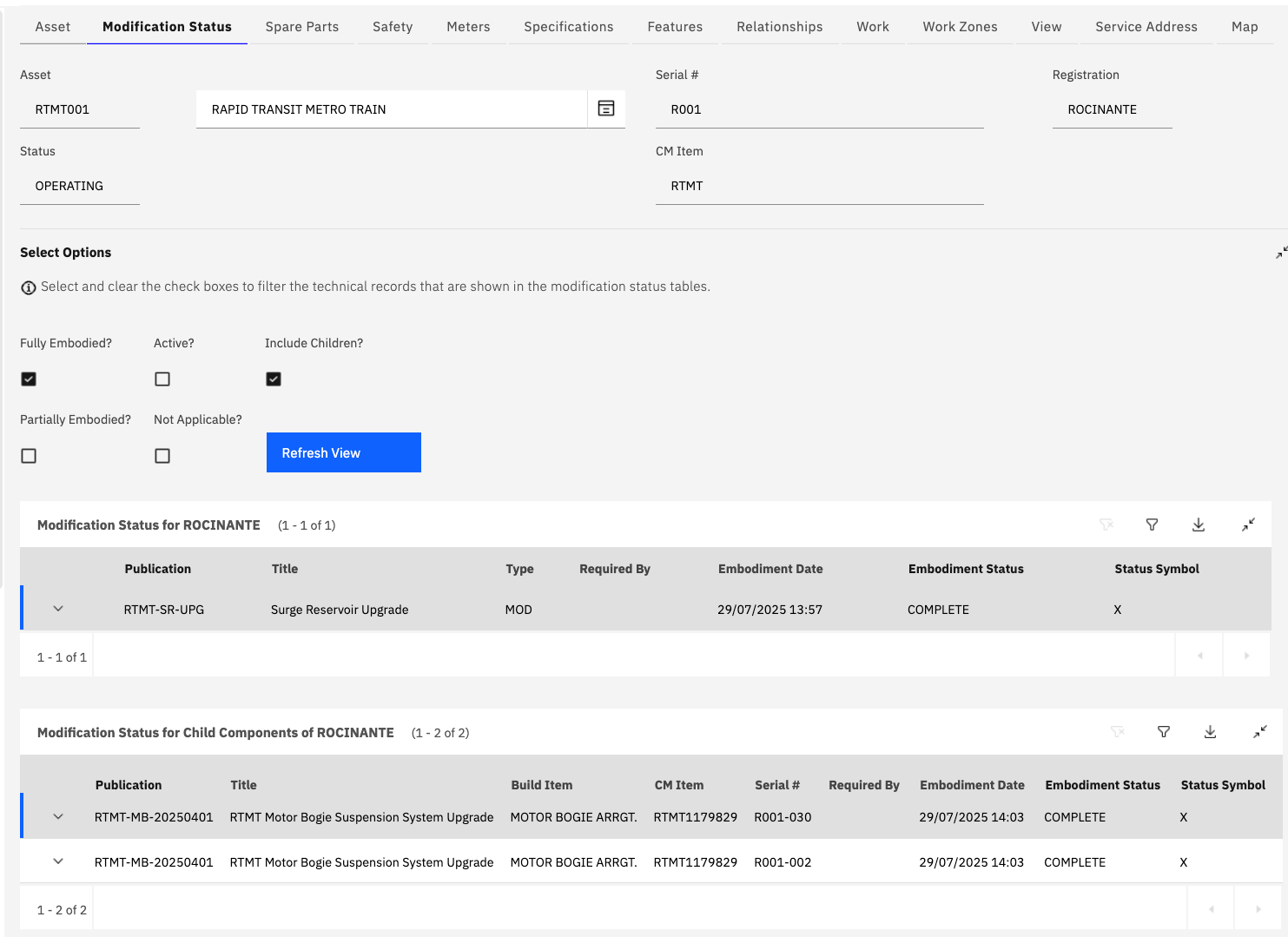
The Modification Status tab displays information and the status of Technical Records which are applicable to the current configuration-managed asset. A number of options are provided to filter the table(s) displayed on the tab. When an option checkbox is changed the "Refresh View" button should be clicked to update the data within the tables:
| Option | Description |
|---|---|
| Include Children? | When set to true, this checkbox causes a second Modification Status table to be displayed. The table list the modification status of Technical Records against the sub assembly assets within the main asset hierarchy. |
| Fully Embodied? | When set to true, the tables will display any Technical Records which have been fully embodied (complied with) for the asset(s) |
| Active? | When set to true, the tables will display any Technical Records are active and applicable to the asset(s) but have not yet been complied with. |
| Partially Embodied? | When set to true, the tables will display any Technical Records which are active but have only been partially emboded. This is a special status to indicate work may have been started against the asset but has not yet been fully embodied (eg a two part service bulletin). |
| Not Applicable? | When set to true, the table will display any Technical Records which are active against the asset but have been marked as not applicable. |
Each table provides details on the specific Technical Records which are active and applicable to the asset. It includes details of when and by whom the change was performed by.