Assets (CM) - View Tab - Maintenance Plan
Overview
The "Maintenance Plan" tab is used to understand the open "Maintenance Events" which exists for a configuration managed asset.

Maintenance Events are persisted in the table "PLUSALFEVENT"
The system maintains a single maintenance event for each open corrective (non PM generated) work order that exists for an Asset.
Once the work order associated with a Maintenance Event is completed then the event is placed into history.
These historical maintenance events are then visible on the Maintenance History tab.
In addition, one or more maintenance events are created and managed for each active PM that exists for the selected asset.
In the case of active PMs, one maintenance event is managed for each frequency criteria defined on the PM.
In addition multiple additional maintenance events may exist for a single PM if there are multiple open work orders for the PM.
For example an active PM, with both a calendar and meter based frequency, would display two rows for the PM on the Maintenace Plan tab.
Each maintenance event gives information relating to the frequency information and when it is next due, including time or meter units remaining.
It may also contain a link to the Work Order (if an open work order exists for the PM)
Due to the way the Maintenance Event records are managed by the system, it enables a user to easily view and understand the open scheduled and corrective work that exists for configuration-managed assets.
In addition, a full history of all work performed can be easily viewed and understood.
The Maintenance Plan also enables the user to view the active maintenance for the selected asset at any "As of Date", either at the current date and time or at a point in time in the past.
Note that if a PMs status is changed to INACTIVE then the system will either:
- Delete the maintenance events(s) if there are no open work orders for the PM. 2) Retain the maintenance event(s) for each open PM work order for the inactive PM. These maintenance event(s) are retained until such time that the work order is completed (at which point they are place into history). If the work order is cancelled then the maintenance event is deleted.
Relationship between Maintenance Events and the BDI
Maintenance Event records are utilised by the BDI to determine whether specific problem codes should be reported.
These are described below:
| Problem Code | Description | Explanation |
|---|---|---|
| EBA | Event beyond alert | The active PM is past either its Alert Date or Alert Count. |
| EBW | Event beyond warning | The active PM is past either its Warning Date or Warning Count. |
| EBD | Event beyond due | The active PM is past either its Due Date or Date Count |
| ENR | Event needs review | The active PM requires manual review to ensure its Due Date / Count are accurate. |
Explanation of field values in table columns:
Frequency:
The frequency value defining the interval at which a PM should be completed. This can be either calendar or meter based.
Meter Unit:
The meter unit description or calendar unit for the frequency interval.
Active:
Either the date and time at which the maintenance event became active or the meter count for the asset when maintenance event was activated.
In the case of a PM record for a calendar based frequency, this is typically the date and time the PM was last last performed.
For a PM record with a meter based frequency this is the meter count when the the PM was last performed.
For a corrective maintenance work order this displays the Reported Date of the work order.
Since:
This field displays either the number of days or meter units recorded since the maintenance event became active.
For a calendar PM or correct maintenance event this is the number of days since the PM was last performed or number of days since the work order was raised.
For a meter based PM the field displays the number of meter units accumulated since the PM was last performed.
Due:
This field displays either the Due Date (for calendar PMs or deferred work orders) or the meter count at which the work is due (for meter PMs or work orders deferred by a meter value).
End Item Due Count:
The count at which the work is due at the end item level (top level asset).
Deferrals:
Checkbox which, if true, indicates that a work order has been deferred. Deferrals are perfomed in the Work Order Tracking (CM) application.
Left:
The number of days or meter units remaining before the work is due.
Work Order:
A work order number.
Explanation of field values in the table detail:
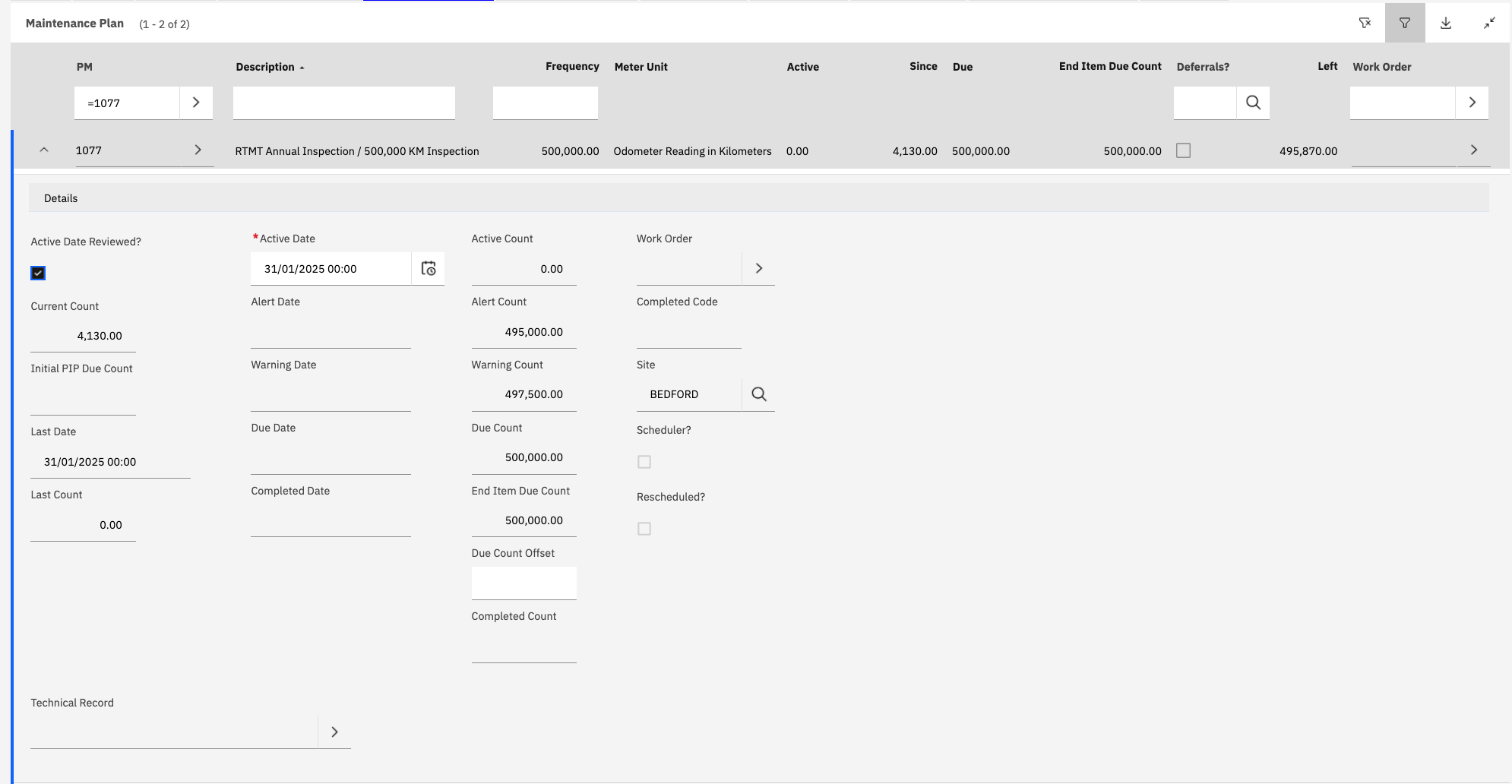
Active Date Reviewed:
This checkbox indicates if the frequency information for the maintenance event needs to be reviewed.
This checbox is generally set to false for PMs that were created automatically by the system.
For example, if a new Master PM was made active and the system created PMs for the assets with the same CM Items as listed on the Master PM.
In this scenario, it requires that a user must manually review the maintenance event and ensure that the point at which is next due is acccurate.
If it is then the checkbox can be set to true and the record saved.
If the checkbox is set to false the BDI will raise a ENR (Event Needs Review) problem code for the PM. This is considered to be an INVALID configuration as scheduled maintenance is active but not correctly initialised.
The system will not automatically created work orders for PMs where the associated maintenance event is marked as needing review.
Current Count:
For meter based maintenance events, displays the current total for the meter.
Last Date:
Displays the last date that the PM was completed.
Last Count: Displays the meter count at the date of last PM completion (relevant for meter based events only).
Active Date:
The date and time at which the maintenance event became active. Normally this would be the same as the date the PM was last completed. For corrective maintenance this is the report date of the work order.
A further explanation of how this effects alert, warning and due date/count calculations is decribed in detail later in this topic.
Alert Date:
The Alert Date of the maintenance event. Applicable for calendar based PMs only. The BDI will generate a work order automatically when the alert date is reached or exceeded.
An EBA (Event Beyond Alert) BDI problem code is raised once a PM has reached or exceeded the Alert Date.
Warning Date: The Warning Date of the maintenance event. Applicable for calendar based PMs only. An EBW (Event Beyong Warning) BDI problem code is raised once a PM has reached or exceeded the Warning Date.
Due Date:
The Due Date of the maintenance event. Applicable for calendar based PMs only.
An EBD (Event Beyond Due) BDI problem code is raised once a PM has reached or exceeded the Due Date.
Active Count:
The meter total for the asset at the Active Date. See later in the topic for an explanation of the logic around meter calculations in relation to maintenance events.
Alert Count:
The Alert Count of the maintenance event. Applicable for meter based PMs only. The BDI will generate a work order automatically when the alert dcountate is reached or exceeded.
An EBA (Event Beyond Alert) BDI problem code is raised once a PM has reached or exceeded the Alert Count.
Warning Count: The Warning Count of the maintenance event. Applicable for meter based PMs only. An EBW (Event Beyong Warning) BDI problem code is raised once a PM has reached or exceeded the Warning Count.
Due Count:
The Due Count of the maintenance event. Applicable for meter based PMs only.
An EBD (Event Beyond Due) BDI problem code is raised once a PM has reached or exceeded the Due Count.
Explanation of Calculations used in Maintenance Events
Both the "Due Date" and/or "Due Count" for a Maintenance Event record is calculated based on the Active Date recorded on the maintenance event and the Frequency/Interval of the associated PM.
These calculations are described below
Calendar Frequencies:
Due Date = (Active Date + Calendar Frequency) - Due Count Offset
Note: The "Due Count Offset" is optional but can be used to adjust the Due Date in the case where the Active Date + Calendar Frequency does not give the desired due date value.
When PM "Alert and Warning Interval State" = Absolute from Active:
Alert Date = (Active Date + Alert Interval) - Due Count Offset
Warning Date = (Active Date + Warning Interval) - Due Count Offset
When PM "Alert and Warning Interval State" = Absolute Prior to Due:
Alert Date = Due Date - Alert Interval
Warning Date = Due Date - Warning Interval
Meter Frequencies:
The calculation for meter based maintenance events involves the use of the calculated life algorithm.
Due Count = (Active Count) + Meter Frequency) - Due Count Offset
Where Active Count = The meter total derived by the calculated life algorithm for the asset at the Active Date.
Note: The "Due Count Offset" can be used to adjust the Due Count in the case where the Active Count + Meter Frequency does not give the desired due count value.
When PM "Alert and Warning Interval State" = Absolute from Active:
Alert Count = (Active Count + Alert Interval) - Due Count Offset
Warning Count = (Active Count + Warning Interval) - Due Count Offset
When PM "Alert and Warning Interval State" = Absolute Prior to Due:
Alert Count = Due Count - Alert Interval
Warning Count = Due Count - Warning Interval